How to Get the Tiny C Compiler
How to acquire a C compiler
In this article, we explain what you need to do to acquire a C compiler and how to get your program ready for execution.
First, you need to acquire a C compiler. There are many C compilers available for free on the Internet. Our favourite is the Tiny C compiler available at
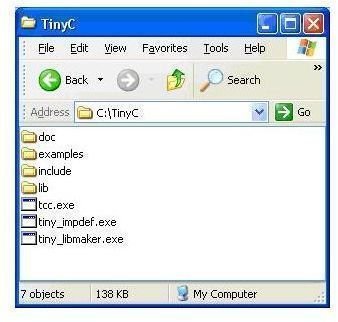
Go to the site, scroll to Download and click on the link tcc-0.9.24-win32-bin.zip next to “Windows binary distribution”. Save the file to your Desktop or any other convenient place of your choosing. Extract the files to a folder called TinyC, say, on your C: drive. You should see the following in the folder:
The compiler is in the file tcc.exe. Tiny C is a blazingly fast compiler. It is also very small. The complete compiler with support files is about one megabyte – it can fit on a diskette!
How to store your program
In C Programming For Beginners – Part 3, we met the following program which calculates the area of a square:
#include <stdio.h> main() { int a, s;
printf(“Enter length of side: “); scanf("%d”, &s); //store length in s a = s * s; //calculate area; store in a printf(”\nArea of square is %d\n", a); }
Next, you must type the program to a file: you can name the file AreaOfSquare.c. It is recommended that you use .c for any file that contains a C program.
You must store your program as a text file. You can use Notepad or WordPad. You can use Word (or another word-processor) but be sure to save it as a text file.
For convenience, we assume that you have created a folder C:\CPrograms and will store your programs there.
Summary: we assume the Tiny C compiler has been installed in
C:\TinyC
and your program is stored in a file AreaOfSquare.c in the folder C:\CPrograms.
In the next article, we show how to compile and run the program.
References
Reference text: C Programming - A Beginner’s Course
Related programming references
This post is part of the series: C Programming for Beginners
A straightforward introduction to Programming in C for people with no previous programing experience.
- C Programming For Beginners - Part 1
- C Programming For Beginners - Part 2
- C Programming for Beginners – Part 3
- C Programming for Beginners – Part 4
- C Programming For Beginners - Part 5
- C Programming For Beginners - Part 6
- C Programming For Beginners - Data Types
- C Programming For Beginners - Part 8
- C Programming For Beginners - Part 9
- C Programming For Beginners - Part 10
- C Programming For Beginners - Part 11
- C Programming For Beginners - Part 12
- C Programming For Beginners - Part 13
- C Programming For Beginners - Part 14
- C Programming For Beginners - Integer Data Types
- C Programming for Beginners - Part 16
- C Programming For Beginners - Integer Expressions, Operators and Precedence
- C Programming For Beginners - Part 18
- C Programming For Beginners - Printing Double and Float
- C Programming For Beginners - Mixing double, float and int
