Using Linux Open Source Tools to Convert FLV to AVI
Introduction
FLV (Flash Video) became the de facto video sharing format on the Internet that has been made popular by YouTube. The video files have either the extension FLV of F4V and have no problems when viewed inside the browser. However, when they are downloaded, it becomes hard to play them; you need Flash Video codecs to do that.
It is better to convert the files to other file formats, such as AVI, MPEG, OGG, etc. and save them in order to avoid codec problems later on. For example, you may want to share the videos with your friends and some of them may not have Flash Video codec installed.
Convert FLV to AVI
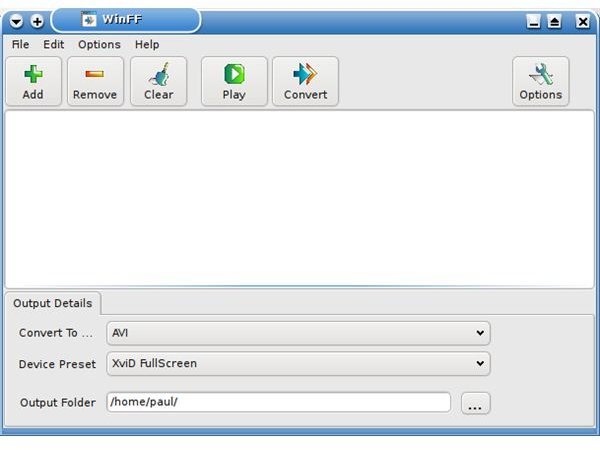
We have already covered converting FLV files to AVI files in one of our previous articles. Just to refresh our memory, we have used the WinFF program for this. We added files we wished to convert with the “Add” button on the top and then under the “Output Details”, we have selected the format in which we want to have our files. We have then selected the folder in which we wanted our files to be saved and then hit the “Convert” button to convert the files. WinFF is present in many distributions’ repositories. You can easily install it from your package manager (Bright Hub tip: WinFF is also available for the Windows platform).
For the users who prefer the command-line, WinFF is basically a graphical front-end to the powerful tool ffmpeg. To convert files from the command line, open up a terminal and navigate to the folder which contains your video files; say /home/user_name/Videos/FLV. You switch to that directory with cd /home/user_name/Videos/FLV and convert your files with ffmpeg -i videofile.flv videofile.mpg.
Conclusion
Video conversion requires a considerable amount of system resources. If you have a slightly older computer, or if in any case do not want to dedicate your system to the file conversion process, here is our Bright Hub tip: Instead of converting them on your computer, convert them in the cloud! There are popular video conversion sites, which let you upload your videos or just copy → paste a URL and then send you the converted file’s link. Zamzar and Vixy.net are two of these video conversion sites.
I personally use Zamzar and will follow an example from there: Go to Zamzar’s web site and switch to the “Download Videos” tab at the bottom. Paste the web address which contains the FLV video. Select the output file format, enter your e-mail address and hit “Convert.” When your video is converted, you will receive an e-mail which contains the link that points to the converted file. Follow the link and download the file. It’s that simple and involves no system resources.
