Fast File Compression in Linux - CRC Error and Steps for Fixing CRC Errors
Cyclic Redundancy Errors (CRC Check Failed Error)
When archives are spanned (or split) and distributed, there is a possibility that one of the archive files may become corrupt and block the whole archive from being unpacked, which is called a Cyclic Redundancy Error. You can see the error “CRC Check Failed” in archive managers, which tells you that one of the files is corrupt.
Being Careful When Downloading RAR Files
There is a chance to recover RAR archives if and only if the person who created the file has also included a parity file. There are two parity file types, PAR and PAR2. PAR2 being the newer version. These file types are most common in newsgroups and are very rarely found in the forums. When you see a PAR file make sure you download it. It is usually a couple of KB but it will save you from hours of re-download.
If you have PAR files, then you can correct the errors in the RAR files. For that, you will need a program that can process the information contained in the parity files. You do not need to use the command line for this purpose, there are very nice graphical programs available:
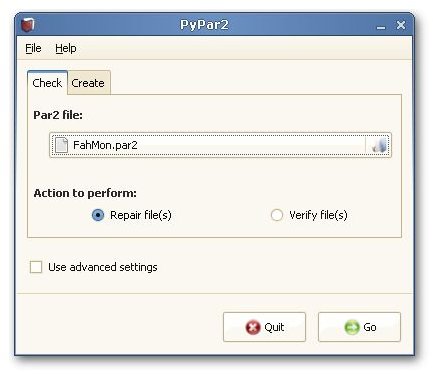
You can check your distribution’s package manager and install one of them. The usage is the same for all; there are just cosmetic interface differences. I will go with PyPar2.
Copy all the RAR and PAR2 files you have into a directory. Then open PyPar2 and in the “Check” tab, open the Par2 File and make sure the “Repair file(s)” are selected. There is no need to use the “Advanced Settings” for now. Click the “Go” button, where the program will check the PAR2 file and the RAR files and make the necessary corrections/modifications. You will be presented with a terminal window with the commands, recovered files and status of the job. When everything is finished, you will see “Success” and the terminal window will close. Now you can open your RAR files and extract the contents without any problems.
What to Do When All Else Fails?
As a tip, note the file name which generates the error and continue the archive operation, and see if you receive the same error with any other file. If yes, note the file until the program finishes. Then re-download only the files that gave you the error and try unpacking again. If everything is well, you will be able to open your archive fully. If not, re-download the file with the CRC error (yes, again.) If you receive the same error again, there is a strong probability that the file on the server is corrupt. But of course, this is the way to go if you are really helpless.
This post is part of the series: Fast Compression for Linux
In this article series we look at the various compression formats present in the Linux world and the ways to handle them. We also look at the most common error with the compressed archives, the CRC Check Error.
