Using Linux Applications - Installing and Uninstalling Linux Software
Introduction
We have covered many items in our “Linux tips we should all know” series. Now, we will cover the basic and everyday points that we have to take care of to have a smoother experience with our Linux computers.
Installing/Uninstalling Applications “The Clean Way”
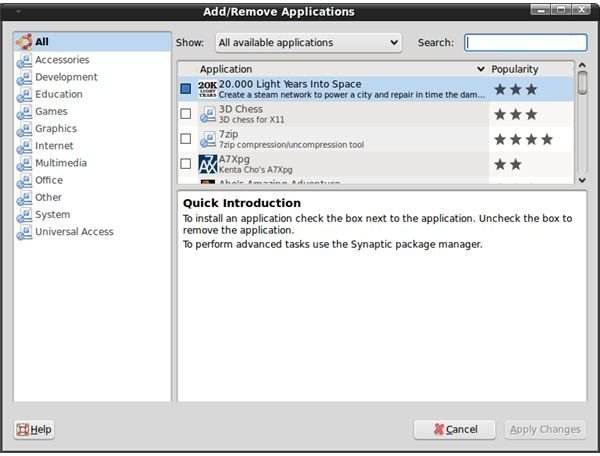
In almost all Linux systems, there is a concept called the “package manager” which makes software installation and uninstallation much easier than in Windows. When you instruct the package manager to install a particular program, it looks at its database, checks the files which the software requires to run (called dependencies), determines if these dependencies are already installed, then goes to the Internet (to its repository), downloads the files it needs and then finally installs them. Uninstallation is the reverse of this process: it checks the file that you want it to uninstall, then checks the dependencies and if the dependencies are used by any other installed program and if not, it deletes the relevant files from your system.
You will also find many programs on the Internet that are offered as source code and have to be installed manually, most of the time by using the configure && make && make install routine.
When you are installing and uninstalling applications, consult your package manager first. If your distribution has it in its repository, go with the installation. If not, go to the program’s home page and see if it can be installed for your distribution by adding/enabling an additional repository. For example, openSuSE is not shipped with the codecs to run restricted format media such as wmv files. To install them, you have to add the Packman repository and then go with selecting the relevant package and installing it. In Ubuntu, there are the Multiverse and Universe repositories to be enabled to install the codecs.
Think twice before adding and using additional repositories. During the last weekend, my Ubuntu update failed because I have installed OpenOffice.org 3.0 from enabling another repository and it conflicted with the Ubuntu update of OOo. I could solve the problem by uninstalling OOo 3.0, disabling its repository, and going only with the Ubuntu update.
Compiling and installing from source should be your last bullet if you can not do anything else, to say, if you can not find the program in your distribution’s repository and/or by adding another repository or by downloading the package in the format that your distribution supports, such as rpm, deb etc..
System Preferences
When you are playing with your system preferences, changing the icons, colors, fonts etc. are fine. However, when you are downloading and installing themes, be careful. First have a look at the desktop environment that you are using and its version. Second, check the theme’s instructions and make sure that it supports your desktop environment’s version. For example, if a theme is designed for Gnome 2.22 only, do not try to install it if you are using Gnome 2.24. The same is true for KDE: if you are using KDE 4.2, do not go for themes that support the KDE 3 series. The best thing that can happen is you will have a bloated desktop; the worst is that you will not be able to see your desktop again.
Working with OpenOffice.org
When you are using OpenOffice.org (OOo), think about with whom you are sharing files. If you are exchanging files with Microsoft Office users, setting the default file save extension to Microsoft Office formats will save time. You can do that by going to Tools → Options, expanding “Load/Save” in the left pane, and selecting “General.” Then, at the bottom of the right pane you will see “Default file format.” Select the appropriate file format in the “Always save as” dropdown box. It does not matter which OOo application you use to do this, as your preference is applied globally. For example, if you have opened OOo Writer and changed the option, your presentations that you create/edit in Impress will be saved as ppt files.
Remember that you can always extend OOo’s functionality with extensions and templates.
Multitasking
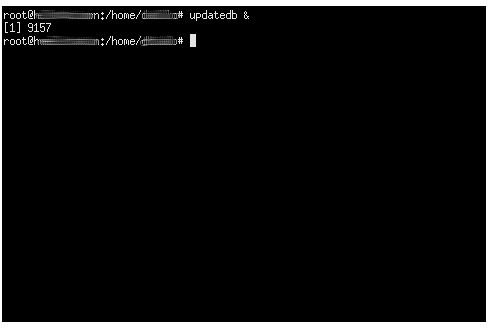
Linux is where the multitasking options are almost infinite. I will give you an example that I use very often, which is the locate command. In order to use locate, findutils-locate has to be installed on your system. Locate basically locates files on your computer by checking its database. The database is updated by the updateb command. In order not to block my terminal session and continue my work, I simply issue the command by adding an ampersand (&) character to the end such as updatedb &. This makes the command work in the background and silently closes itself when it is done. You can check the progress by issuing the jobs command and typing fg process_id to bring the command to the foreground (jobs command displays the process id in square brackets.) You can apply this to other command line applications as well; an example may be to convert your ogg files to mp3 to use with your mp3 player. You can issue the command to work in the background while you continue your work. Sending a job to the background makes it use the idle system resources. So, if you are using a resource-intensive application in the foreground, the background task won’t interfere.
Getting Help on the Internet
When you are stuck after reading the help files, man pages, developer’s website, and Googling , the only place left to go is the forums. Linux forums are active forums and chances are high that your question will be answered in a day (consider the time difference; if you are in the US asking questions and the other person is in India, you have to expect some delay). Personally I find LinuxQuestions useful for all questions, openSuSE forums for openSuSE questions, Ubuntu Forums for Ubuntu questions. As you have guessed, if your question is something about your distribution, for example how to perform a task, how to install something, etc., go to either LinuxQuestions or your distribution’s official/unofficial forums. If your question has something to do with a particular program, such as enabling listening mode on your wireless card in Kismet, then the best place to go is the program’s forums.
This post is part of the series: Linux Tips We Should All Know
In this series we target all the Linux users by touching the points that make our Linux experience enjoyable in the long-term. We look at the best practices for using applications, tips for analyzing log files, distribution troubleshooting and many others.
