Linux Mint 6 Felicia Review - Page 1
Introduction
Linux Mint is essentially built on Ubuntu, which is in turn based on Debian. This solid root gives the distribution a strong foundation and allows access to a wide variety of programs from its repositories. The Felicia release comes with 2.6.27 kernel, Gnome 2.24 and Xorg 7.4.
Linux Mint supports 32 and 64 bit processors. There is an x64 release which is optimized for the 64-bit processors but 32-bit version also has support for 64-bit.
There are the Main and Universal Editions of Mint. The difference is that the Main Edition has all the codecs preinstalled, so mp3 and other restricted formats work out of the box, as well as the proprietary drivers for ATI/NVidia graphics cards and proprietary software like Acrobat Reade and Adobe Flash. This “all-included” distribution is a very good beginning for the users who are making a switch from Windows. They will have everything ready and they will not go through the process of adding/enabling repositories and finding/installing the necessary codecs. This is one of the competitive advantages of Linux Mint and helped it to be one of the most used distributions.
There is more than the preinstalled codecs. Mint has very nice features for the end user, which we will look at one by one in our article.
Installation
The CD/DVD starts as a Live CD and you begin to experiment with Mint. To install it, you double click on the installation icon. Select your language, time zone, partition, keyboard layout and go. The typical installation takes less than half an hour. After the installation, you will be asked if you want to enable root login. Although this is not recommended for security purposes, you can choose to go with it. The next window asks if you want to enable fortune messages. These messages can be fun, so why not give them a try? You can remove them later if you wish.
When you are done with these two screens, you can log on to your Linux Mint desktop. As I have mentioned above, you will be greeted with a familiar Gnome environment. The menu (Mint Menu) is very similar to openSuSE’s menu. After a couple of minutes you get used to it.
With the default installation you have Firefox 3.0.3, OpenOffice.org 2.4.1 (3.0 is available in the repositories), Gimp 2.6.1, and MPlayer 1.0 Release Candidate 2. The Network Manager is right on track with the 0.7.0 release. The support is added for connecting to GSM and 3G networks and Virtual Private Networks. Very well done.
For the supported graphics cards, there are settings for Compiz (installed version is 0.7.8.) and the settings are provided with two different programs accessible from the Mint menu. One is simple, so the users that are not familiar with Compiz do not get lost, and the other is for experienced users who can fine tune their effects.
mintInstall
mintInstall is the distribution’s package manager. Mint developers have put an immense effort for making the simple software installer into a complete package manager. With the Felicia release, mintInstall presents user reviews, popularity, and the screenshots of the programs so you will be able to see what the software looks like. It allows the user to browse the repositories offline.
mintUpdate
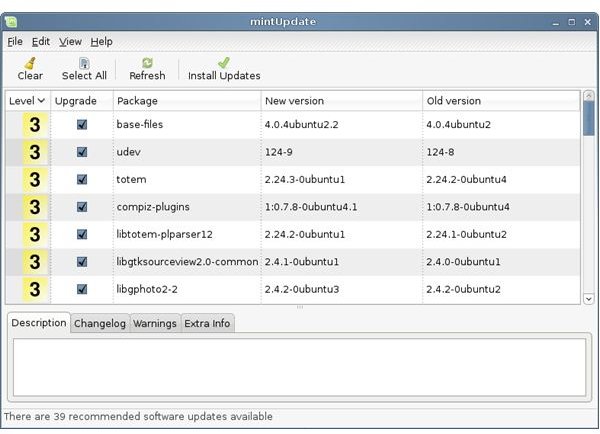
mintUpdate is another of the programs that were overhauled. Linux Mint does not use the default package manager in Ubuntu; it uses its own. In this mintUpdate, the most important change is that it presents the stability/reliability of the software with numbers from 1 to 5. Programs numbered 1 are the ones that have been extensively tested and found secure whereas programs numbered 5 may impact the stability of your system. This allows you to better know what you are doing before installing any program. In addition, mintUpdate also keeps track of the installed updates. So if you experience some instability, you always have the option to remove the update which caused the instability from your system.
mintUpload
mintUpload is a very nice service that gives you a space of 1 GB on the Mint servers to upload your files and share them. When you upload your files with mintUpload, you will be presented with a link that you can send to your friends/family and let them download the files. After two days, the files are deleted from the server. To configure mintUpload, I suggest you to check this nice tutorial.
Giver
Giver is a free applet that enables the users share files if they are on the same local network; you can not use this on the Internet. When you open Giver, it lists the Giver users that are on the same network. Sharing files is as easy as dragging and dropping them on the recipient’s name on Giver. When you do that, the recipient is immediately notified of the files and presented with “Accept” and “Decline” choices. A very nice feature, I believe.
AptOnCD
Another fine feature of the Linux Mint distribution is AptOnCD. The program allows you to write the programs and updates you install on your system to a CD/DVD. This way, you can set up one computer and install the same system on multiple computers. Assume that you have a desktop and notebook that are both running Mint. You can update your desktop with all the patches and install the programs you want then burn everything to a DVD and then pop in the DVD to your notebook to update it.
mintNanny
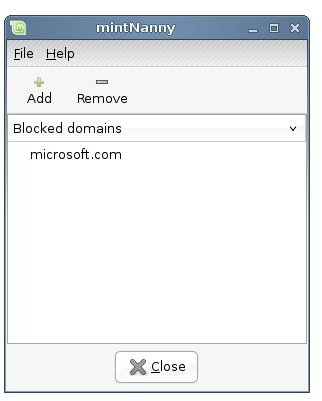
mintNanny is Mint’s parental control program. I can not say that this one is a real must-have because its inner logic is no more than simple. When you insert a blocked domain in the program, it edits the /etc/hosts file by making an entry for the domain and setting its IP address to 0.0.0.0. Any user that knows /etc/hosts file can open it and see what is done. I do not believe this application is a good parental control application. However, if you and your kids are completely new to Linux you may find this application useful for some time.
mintBackUp
mintBackup makes a compressed tar archive of your home directory with the .backup extension. You can specify which files/folders you want to be backed up, including the hidden files. The compressed file is saved in your home directory. I am quite surprised though, I could not find an option to save the backup file to an external drive. I also believe that adding a backup schedule would be nice. In the present situation you have to manually make backups, then copy the file to an external disk and for scheduling you have to struggle with Cron. I hope the developers have taken note of this and are working on the feature.
Conclusion
In my opinion, end-user oriented distributions have lots to learn from Linux Mint. The chosen software, applications and the features are very welcome and far from being frightening for the newcomers to Linux. If you want a Linux installation that works out-of-the box, put Linux Mint on the top of your list. I personally give 90 over 100 to Linux Mint and seriously consider it for one of my installations.
