Want to work with a flourish? Ubuntu’s mouse gesture applications allow you to keep your hands off the keyboard and do it all with a flick of the wrist.
Mouse Gestures - Firefox Add-ons
Mouse gestures provide computer users with a third way to carry out commands, after the keyboard and the menu system. They can benefit users with certain kinds of visual or movement impairments, and they also provide a way for power users to speed up their work – and impress their friends! Here are some of the mouse gesture program options for Ubuntu.
Firefox add-ons – FireGestures and EasyGestures
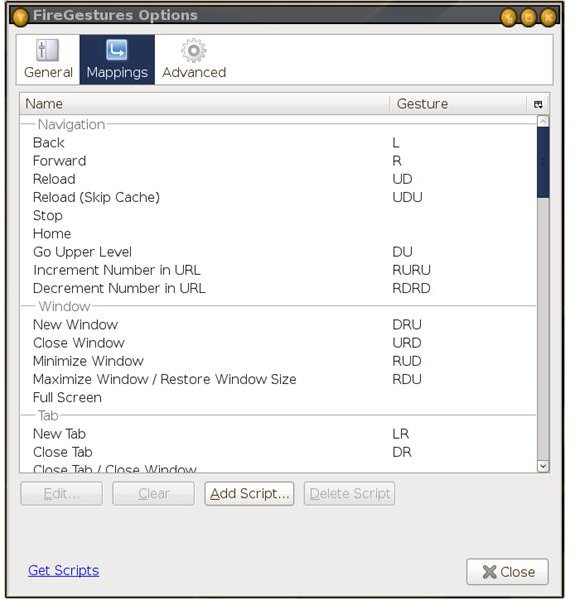
The simplest option is to obtain a simple add-on for Firefox, the default web browser. There are several of these, obtainable from https://addons.mozilla.org (search for ‘gestures’), covering a range of options. The most popular is currently FireGestures , which allows the user to carry out familiar tasks like opening new tabs and windows, jumping to hyperlinks and retracing their steps back through their browsing history via combinations of mouse gestures. These are done while holding down the right mouse button, and there is an option to turn on a green ’trail’ which allows the user to see the shape of the gesture as they do it – handy for novices.
(U=Up, D=Down, R=Right, L-Left)
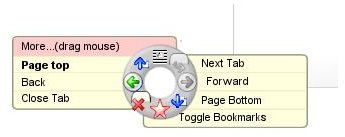
FireGestures uses simple combinations of linear movements – up and down, left and right – plus combinations of the Ctrl, Shift and Alt keys. A different approach is taken by EasyGestures , another Firefox add-on which pops up a donut-shaped icon menu around the mouse cursor when the middle button is pressed. The options on the menu are customisable and can include opening and closing windows, browsing through tabs, and all the options available through the standard menu system. Both programs support ‘rocker’ movements – holding down one mouse button while pressing another.
Easystroke - a system-wide gesture application
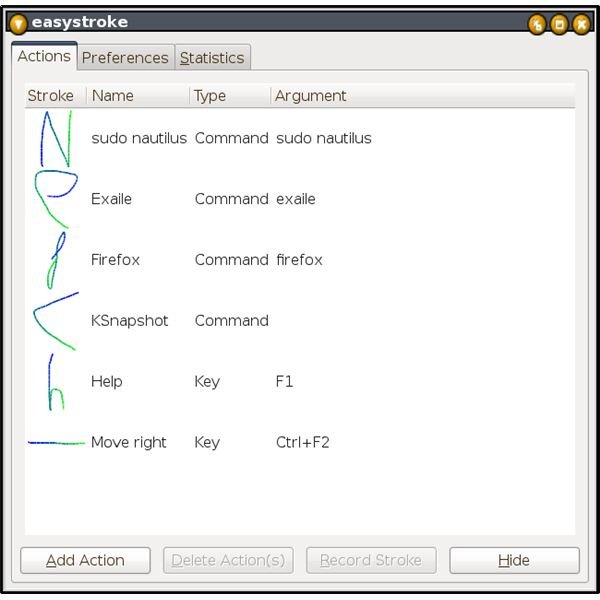
The Easystroke application is available via Add/Remove Programs and can also be downloaded from SourceForge, which hosts the program documentation at https://easystroke.wiki.sourceforge.net . Easystroke works at a more fundamental level than the browser add-ons described above: the user has to define their own stroke shapes and specify the keystroke or terminal command associated with each one. For instance, a cursive ‘f’ could be used to launch Firefox, or an ‘h’ to press the F1 key and call up a Help window.
By default Easystroke uses the middle mouse button (the roller) for the user to press while drawing strokes, but I found this awkward, and replaced it with the right button plus the Ctrl key. As with FireGestures, an optional trail can be left on the screen for a second or two to give some visual feedback. The strokes must be a certain size (small gestures are simply ignored) and each gesture can be given an identifying name. Note too that the strokes have to be drawn in a certain order – a horizontal line from left to right is not the same as a horizontal line from right to left.
Easystroke works well, although it has a few rough edges. One problem I had was recording strokes to stand in for system key combinations; when I pressed the keys to identify some of the ones I wanted they were intercepted by the system before they got to Easystroke. A macro system would help to avoid this. It also fails to include an Applications menu item when installing, so this must be added manually. Otherwise Easystroke is an appealing program which – whether you use it because you need to or simply for fun – could change your computing habits for life.