CeltX Review: The Best Media Pre-Production Software for Linux
Introduction
Contrary to the widely used applications that we reviewed so far, we have a different one this time for creative penguins: CeltX.
CeltX is a media pre-production application that runs on Linux, Windows and MacOS X platforms. It is different from the daily word processors in the sense that it is geared towards media. You can write an entire movie with dialogues, a novel, a screenplay, a documentary, whatever you want to write.
Features
CeltX is not just a specialized word processor. Using CeltX, you can create entire scripts, create a storyboard and arrange scenes, define and change characters, tag them, schedule production steps and receive detailed reports for everybody involved. In addition to all of these, you have a storage space on CeltX server called CeltX Studios which allows you to store your projects securely.
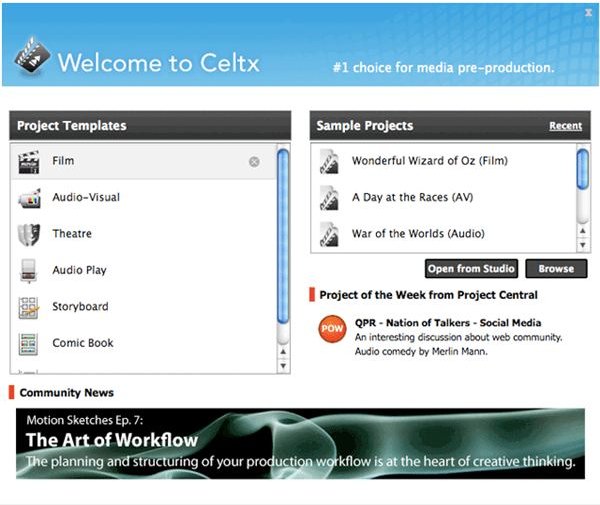
The program starts out simple and continues simple. When you start the program, a window greets you asking about what you would like to do. You can choose from readily available templates (in the left pane) or choose from samples (in the right pane). If you have already uploaded your project to CeltX Studio, you can it select from this window also.
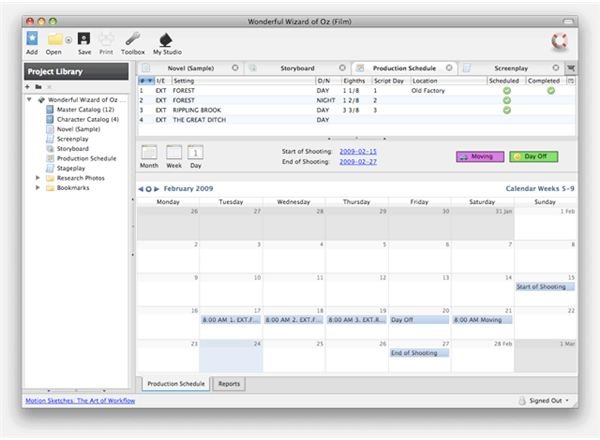
After the selection, you are taken to the production window. Here, the screen is divided into two (not counting the icons at the top). On the left, the project is displayed as a tree, including the catalogs, photos, and bookmarks, and on the right, at the top, you have the text editor, storyboard, production schedule, and the screenplay. The remaining area on the screen is for your scripts: unleash your creative side!
What’s more, you can add audio and visual elements, digital and scanned documents, and photographs to your project. So, you will not only work with text, you can collect all your media related to your project to one place and keep them handy. Plus, any idea that pops up, you can take notes: just switch to the “Screenplay” tab.
In the storyboard view, you can post photos and write your comments. This will enable you to visualize your story by sequence. You can also hit the “play” button at the top and see your story from the beginning.
The scheduling tab is very easy like the rest of the program. The calendar takes up most of the screen space. This is where you can enter your project’s schedule. You can also manage your calendar as tasks. For example if you have scheduled a night shot, you can mark it completed when it is done. This is a great feature to plan and track your progress.
Conclusion
With my experience with the software –though I am not an artist in any sense- I found it to be functional, stable, and flexible. The interface is easy to use, which lets you focus on your work rather than going through detailed menus to find what is where.
The program uses Latex as its back end text processing, which is the standard used in many academic institutions and in professional printing. Therefore in the output, whether as PDF file or print-outs, you will immediately notice the quality of your documents.
One of the program’s uses is the ability to write a novel. You can apply this and go about creating your long documents with it; it will just take a little time of yours to get going.
You can download the program from the CeltX download page.
