There is a lot to say about LinuxMCE, which really is an out-of-this-world media center distribution, easily surpassing all others with its features and performance characteristics. Read on to see what mind-blowing functions it offers and why I consider LinuxMCE to be the best Linux Media Center.
Installation, Configuration and Features
If we had an “Editor’s Choice” award the media centers, I would vote without question for LinuxMCE. I have several reasons for this and I am sure you will appreciate this distributions huge potential for home automation as you reach the end of this article.
First of all, LinuxMCE is not a software package in the traditional sense, that you can install to your system, it is a complete Linux distribution based on Ubuntu, and the releases follow Ubuntu notation; such as the latest release being 0710, based on Ubuntu 7.10 (Gutsy Gibbon).
To download, you can go to the download page , download from torrents or ftp/http. To install, you have two options: if you have an existing Kubuntu 7.10 installation you can upgrade it with LinuxMCE (slowest and painful) or you can go for a fresh install from DVD (fastest and recommended).
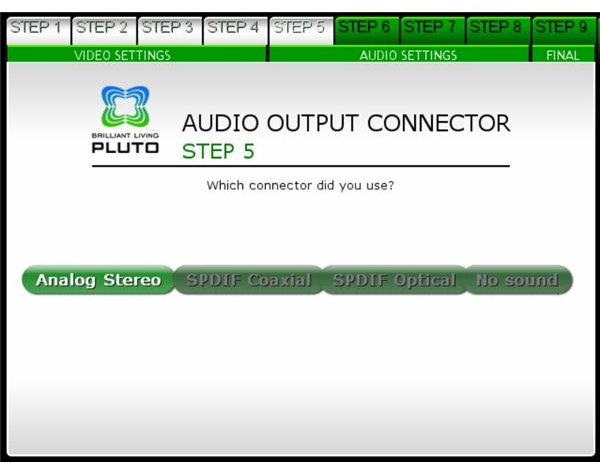
The installation focuses on detecting your hardware, screen and other peripherals, which is different from a normal operating system installation. The first part is about choosing your screen (or TV) resolution and the connection type (VGA/DVI/S-Video/Component/Composite), adjusting your screen size, choosing connection type (analog audio, S-PDIF Coaxial, S-PDIF Optical), choosing sound volume, testing Dolby and DTS, and finalizing.
Do not get frightened by all these options, the installation wizard finds them automatically and asks for your confirmation before carrying on to the next screen. Everything is completed in five minutes with the wizard. But for the installation and putting everything in place, you need about 30 minutes depending on your computer’s configuration.
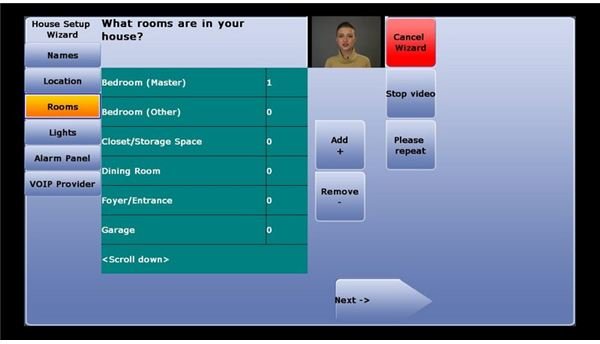
After the installation, you will go with the “House Setup Wizard”. In this wizard, you will add the users of LinuxMCE. There is something important to note here: these users will be the users of the media center, not the entire installation. If you have a home network, I strongly recommend you go into each screen step by step, and define each and every room and every user. Making detailed definitions in this setup will enable you to manage things with greater ease later on. You can also add your home’s floor plan to the LinuxMCE, which I also recommend. When you are going through the wizard, you will see that LinuxMCE has passed the boundary of being a media center and reached the point of home automation center - If you have plug and play lighting systems, alarms, A/V equipment (DVD players, receivers, DVRs), climate equipment (thermometers, air conditions, pool, jacuzzi systems, sprinklers). Last (but not least) you can also connect your telephones to LinuxMCE. Overwhelming I know, but the good part is that all of these items need not have an Ethernet port, as you can go with X10.
Next: Remote controls, managing media, usage scenarios and our opinion.
Remote Controls, Media Management and Verdict
Of course at this point you may be questioning the need for remote controllers? In LinuxMCE jargon, these are called “orbiters”. Such orbiters can be your smartphone (Symbian or Blackberry) or dedicated remote control or an Internet tablet (such as the Nokia 800) or a Bluetooth/Wi-Fi enabled device. To use an orbiter, it must be somehow connected to your home network. Considering the capabilities of Bluetooth, I suggest you take a small walk inside your house: put one Bluetooth phone where you place the media center and make it discoverable. With another phone, visit all the rooms and see if you lose connection. If the connection works everywhere, then you will be done with a Bluetooth dongle. If not, you can consider using a Wi-Fi enabled device.
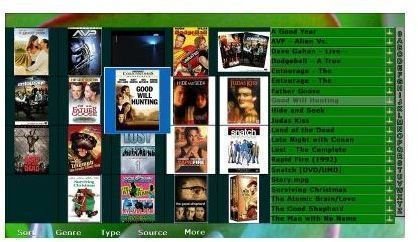
With all these features, I will not go into the details for viewing your photos, listening to music, watching your videos and watching TV. Have a look at the image and you will see what options are available. Needless to say they are plentiful. Ah, by the way, the screenshot is taken in a low-resolution setting. High-resolution brings alpha transparency.
When everything is complete you will have a stellar, and secure, automation center for the entire home. Let’s say you have two kids, one is 8 and the other is 17 years old, sitting in their own rooms with their own computers. You have lots of movies stored in the media center, or someplace on your network. You can define restrictions for your kids with their names or with their rooms. So, you will be able to restrict your 8 year old from watching “Teen” rated movies. It is easy to define all these restrictions inside the LinuxMCE Administration panel.
The bottom line is, with so many options, do not feel that LinuxMCE is for experts; all the menu items are intuitive and it is very easy for you to find your way around LinuxMCE, with everything being available through a point and click user interface. But as I emphasized before, you have to have everything defined properly before making such configurations.
Further uses are only limited to your imagination. Suppose that you want your lights to go dim when you start watching a movie. You can define an event under “Watching media” and add the appropriate commands (dimming lights in this case). Another option can be to turn on the lights when you enter a room. You can do that too by defining another event. Or have your sprinkler systems running in the garden for a specified period in time. Do not think that these are the only options, I am not a creative person and these are what pops in my mind first, you can obviously go further.
Finally, my opinion. If you are a do-it-yourself person, you can go all the way with LinuxMCE and automate your entire home through this distribution. If you decide to do so, I suggest you to start with the distribution’s website and take a look at the supported hardware. You wouldn’t want to go home with all those boxes to discover that a TV card is not working. But when you approach the end step by step, you will see that the efforts will pay in return.
In all I find LinuxMCE to be THE top media center for Linux, which serves many, MANY purposes. I only wish I could personally use LinuxMCE to build my own automation system (I can not do that in my country because it is unbelievably difficult, if not impossible, to find X10 devices.)
This post is part of the series: Linux Media Centers
Surely there is not just one single media center in the world, which happens to come from Redmond? You will not believe your eyes when you see what Linux has to offer in terms of media center software. Be sure to read on to choose one for yourself.


