XBoX Media Center (XBMC) Review: Installation and features (photo viewing)
Introduction, Installation, Features (Photo Viewing)
When I first started using XBMC in my XBoX (the first version, not Live, not 360), I quickly saw that it was also available for my Linux box too, so I wanted to give it a shot. The installation was fairly easy for my Ubuntu distribution, the packages are readily available and it just adds the XBMC repository. Thus, giving Synaptic a refresh, it is simply a click and install process to your system. If you are not using Ubuntu or derivatives such as Linux Mint, third-party packages are available for download here.
After the installation, you can start your newly installed media center through Sound and Video - > XBMC Media Center. As you will immediately realize, XBMC is easy to use with your computer. You can move around and manipulate everything on the program with your mouse or your keyboard.
Before going on, I especially want to congratulate XBMC for their support in reading non-Linux partitions. If you have a dual/triple boot system with different partitions, XBMC can read data from NTFS, FAT, ext3 partitions and USB drives. So in order to watch a movie that you have in another operating system, you do not have to reboot your computer to change OSs. Furthermore, HD displays and various other resolutions are supported.
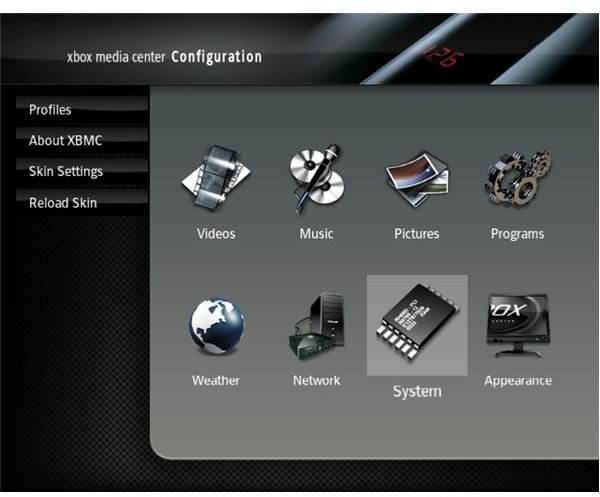
As you would expect from a media center, XBoX has options for viewing images, watching videos, listening to music and checking weather in the default installation. If you have XBMC on both your XBoX and your computer, then you will realize that the “Programs” menu item present in the XBoX is not available on your computer. This menu item is for accessing XBoX programs and therefore is not included in other releases.
Starting from the top menu item, “Pictures” as you guessed gives access to your Pictures. All common file types JPG, BMP, TIF, TGA, PCX GIF files are supported so I do not expect you to have problems with viewing images. There is however one big plus here, XBMC can read and display EXIF information and can be configured to automatically rotate images.
Read on for music and videos management, changing themes and our opinion.
Features (contd), Themes, Verdict
The “Music” feature gives you more than just a listening facility for your music with XBMC. You can rip your CDs within the application, and the program checks websites to retrieve information about your music. As you expect, XBMC supports ID3 tags and you can arrange your library with the information in the tags by album, artist etc.. Shuffling is done through the “Party Mode”. Another neat feature is that playing music files encoded in MP3 and other formats does not require you to install the necessary codecs to your system beforehand. XBMC has its own music player, which has support for many formats such as MP3, MIDI, WAV, FLAC, AAC, WMA, AC3 and RealPlayer.
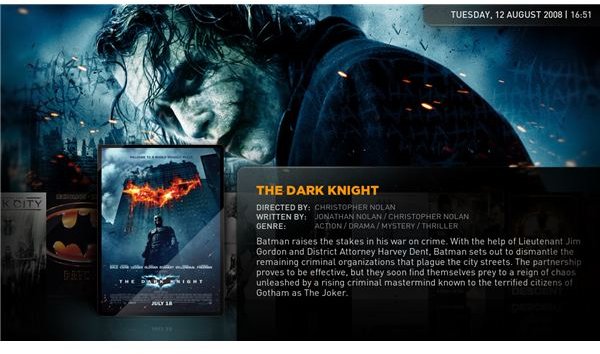
Similarly the “Videos” option has much the same richness of features as “Music”. Not only does it flawlessly plays VCD, DVD, QuickTime, WMV, Flash and RealPlayer files, but it also adds the same library function present in music to videos. You can tag videos and create play-lists and the media center will go off and perform an Internet to search for information pertaining to your videos. As you select your music categories using artist, genre etc. you can select videos by actor, director, year and of course title and genre. Again, XBMC has its own video player and does not depend on other programs like MPlayer or Totem being installed on your system. To watc TV, XBMC uses the MythTV backend. Do not however think of this as a negative, it is a very good decision and product integration. XBMC supports almost every PAL <-> NTSC workouts, digital video guides, TiVo and online TV streams. So, there are no problems either watching stored movies or live streams.
(Our thanks go to onesojourner from Ubuntu forums for the screenshot.)
One final note, XBMC also has theming support. So, if you want to change the look of your media center, you can go to the XBMC website and download the skin of your choice. To help you with the jargon, “themes” are called “skins” in XBMC.
The media center also supports client-server architecture and you can connect to other shared folders in a network, and stream media files from there. If you have a network attached storage (NAS) drive in your home network, you can stream media files from it: just enter its IP in the configuration of XBMC.
Finally my opinion: XBMC is a very capable, standalone media center application. The developers have some more work to do to get everything going, but the latest release (8.10 Atlantis) that I discussed in the article did not have stability issues. If you happen to choose between MythTV and XBMC, believe me it is not easy.
This post is part of the series: Linux Media Centers
Surely there is not just one single media center in the world, which happens to come from Redmond? You will not believe your eyes when you see what Linux has to offer in terms of media center software. Be sure to read on to choose one for yourself.
