Improve Linux Performance with Daemons
What are daemons and why should you stop them?
A daemon is a small program that runs in the background and typically watches for a specific event or input before acting. Daemons do not usually take up much space but, if not configured properly can eat away at precious system memory. Knowing which daemons you should stop on your system depends completely on how your system will be used. If your Linux machine is used as a desktop only then you wouldn’t need such services as:
- apache2 (web server)
- sendmail (mail server)
- bluetooth (enables bluetooth)
- irqbalance (only needed for multi-cpu machines)
- nfs (network file sharing)
- portmap (rpc connections)
- ntpd (network time)
- vncserver (remote desktop access)
There are many more that can be disabled. The best way to know what services are currently running on your machine is to issue the command: /sbin/chkconfig –list | grep “5:on”. From this command you will see a full listing of all the services. A sample entry would look like:
iptables 0:off 1:off 2:on 3:on 4:on 5:on 6:off
This listing indicates at what runlevel the service is on. The above entry, for iptables, is on starting at runlevel 2 and remains on through runlevel 5. When you run that command you will find all the services running that you do not need.
How to stop services
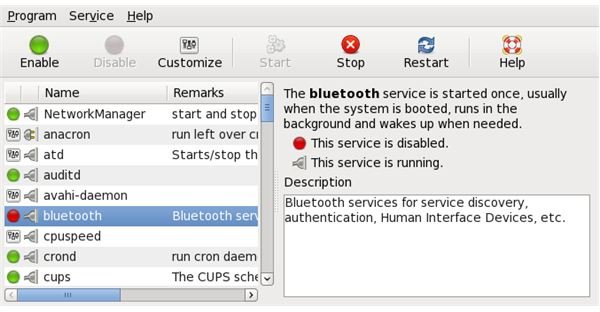
Most modern distributions have graphical tools that allow you to stop services (and keep them from starting). These tools will typically be found in your administration menu (in GNOME look in your System menu in the Administration sub menu). You are looking for an application called Services. This application will require the root user password (or the sudo user password) in order to start.
Once the services application has started it should be fairly obvious how it is used. You highlight a service, click the Disable button, give the root password (if prompted), and the service will not start at boot.
Services Main Window
Stopping via command line
Some distributions also offer a command line option. The most widely used is the ckconfig command. This command is used in this way:
chkconfig service off
The above command will disable a service.
chkconfig service on
The above command will enable a service.
If you think you might have made a mistake using chkconfig on a service issue the command:
chkconfig service reset
which will restore the service to starting at the default runlevel.
Final Thoughts
And there you have it. By stopping unwanted daemons from starting you can gain a bit of performance for your machine.
