In a previous article I described downloading and installing the Linux Mint distro, spun off from Ubuntu in 2006. This article describes the main differences between Mint and Ubuntu.
Mint Versus Ubuntu
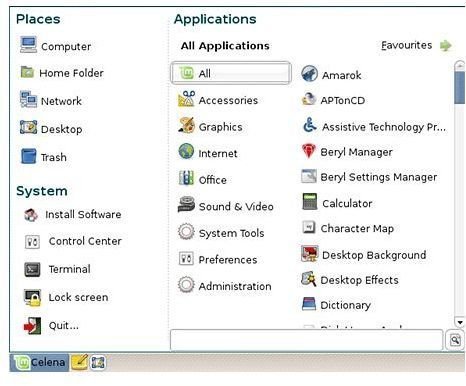
Both Ubuntu and Mint are highly customizable, so it is difficult to point to any one feature that clearly distinguishes one from the other. The Mint menu is more comprehensive, with three panels popping up at once rather than one, as in GNOME Ubuntu; this gives the distro something of a KDE feel . The menu is divided into System, Places and Applications, and each section can be independently scrolled. The menu is customizable and can be set up to use a specified number of columns and to show recent documents.
The ‘standard’ GNOME menu is also available for diehards who are more comfortable with it. The Mint menu system can also be configured to launch items when the user logs in – the equivalent of the Windows ‘Startup’ folder.
Like Ubuntu, Mint will regularly update itself by downloading updates from the Internet, although the icon for this is – for some reason – a padlock rather than Ubuntu’s red arrow. Unlike Ubuntu, the Mint update system includes a ‘safety level’ setting between 1 and 5 for each package, so the user can make their own evaluations of how much each new package will put their currently running system at risk. It can also be customized to control how often Mint checks for new material.
The system also maintains a history of updates, making it possible to trace problems back to the update which caused them.
The Administration and Preferences menus contain a few options not installed by default in Ubuntu:
- MintAssistant – allows the user to set a root password and specify whether or not quotations appear in the Terminal window
- MintBackup – backs up the home directory to a single file
- MintDesktop (under Preferences) – allows the user to select desktop icons, specify the Nautilus mode and determine whether or not to show splash screens for major applications
- MintInstall – described in detail below
- MintNanny – provides for child protection by blocking specified domains from the Web browser
- MintUpdate – the update system as described above
Backup and ‘Nanny’ applications are of course available for Ubuntu outside the default installation package.
Features of Linux Mint
MintUpload is a generic uploading system that will upload a specified file to another location – local or URL based – from the Linux Mint File Manager with a single right-click command. It links by default with a public file storage area set up and maintained by the Mint community, so file-sharing is relatively quick and easy to do. Linux Mint Users can also set up their own paid storage areas on the Mint site, or use the specific application to upload files to sites such as Flickr or YouTube .
Other software installed by default includes GNOME Do, a text-based file finder and application launcher; Nautilus Actions Configuration, a right-click application launcher for selected files and directories, and Giver, a local network drag-and-drop file sharing program. Linux Mint also includes, by default, codecs for open source audio and video formats such as MP3, which are not provided in Ubuntu Linux as they may result in legal problems in some jurisdictions (check your country and local state laws). But all of these can also be installed in Ubuntu via the Add/Remove Applications menu item.
The Linux Mint repositories include files in their own format – .mint – which include installation instructions . Mint also connects by default to the Ubuntu repositories, and most Ubuntu applications will work on Mint without any modification. MintInstall – the application used to install and remove applications – is the jewel in the crown for the Mint system. It includes thumbnail screenshots of most applications which expand to a full-screen view of the application in action, and it allows users to score each application and provide written reviews – a brilliant demonstration of community collaboration in action!
For a Microsoft Windows user’s opinion, check out a review about Linux Mint from Matthew Casperson where he describes his experience with Linux Mint, and why he thinks it’s a worth competitor to Ubuntu.
This post is part of the series: Linux Mint - an ’elegant’ distro
New Linux Mint is a relatively new distribution spun off from Ubuntu, and created and designed with elegance in mind. Their slogan is: ‘From freedom came elegance’.


