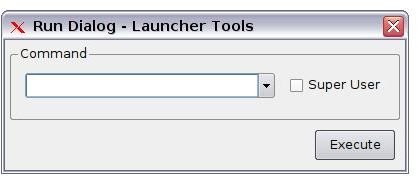
The Eee PC is a great little computer. But it’s missing some simple, but useful, features. One of those is a dialog box that lets you run applications. Thanks to an enterprising user, that’s no longer the case.
Introduction
One thing that I used to miss on my Eee PC was a run dialog box. With most Linux window managers – like GNOME and KDE, for example – you can press ALT+F2 and a small dialog box will appear. Then, you type the command to start an application, and click Run. But Asus, the folks behind the Eee PC, forgot to add a run dialog to the window manager.
Thankfully, the Eee PC community came to the rescue. They’re a group of very passionate users who have been doing interesting things with the Eee PC and who have been writing some useful utilities (like the one discussed in this article).
And one of those applications is Launcher Tools, which adds that missing run dialog.
Getting going with Launcher Tools
Browse to the application’s Web site , and download the installer file. Then, start the File Manager (click the Work tab, and then double-click File Manager) and find the file named altools_0.4.3.deb.
Right click on the file, and the choose Install DEB File from the menu that appears. You’ll be asked for your administrator password (which you set the first time that you started the Eee PC). Launcher Tools only takes a few seconds to install.
Using the run dialog
Launcher Tools is more than just a run dialog. It also comes with an icon tool and an app for modifying the interface. But I’m only going to look at the run dialog in this article.
To open the run dialog, press CTRL+ALT+O. In the field, type the command to start the application that you want to run. For example, I often use the run dialog to start Audacity or Skype Call Recorder . So, to start them I type audacity or skype-call-recorder. You’ll notice that Launcher Tools will try to complete the name of the file for you. When you’re ready to go, click Execute.
If you need to run an application using the administrator account (also known as root), then select the Super User option before clicking Execute. Remember that running certain applications as root allows you to modify or delete system files.
Final thoughts
Launcher Tools is a nifty application that adds a much-needed feature to the Eee PC. It just goes to show what a user who is passionate about something can do.


