doxWiki: The Simple Wiki on Your Desktop
Introduction
If you’re looking for a simple yet flexible desktop wiki, then check out doxWiki. It makes it easy for you to get a wiki up and running quickly. When installed on your computer, doxWiki weighs in at around 260 KB – perfect for your desktop. And it doesn’t need any software other than what’s already installed on your computer.
Getting started
Just download the archive containing the doxWiki files, and then extract it somewhere on your hard drive.
The heart of doxWiki is a simple Web server that’s written in Perl; the Perl software is standard kit with any Linux distribution. To get going all you have to do is install doxWiki by extracting its distribution archive to a folder on your hard drive, and then start the Web server at the command line by typing:
perl SimpleHTTP.pl 8080
In that command, SimpleHTTP.pl is the Web server program, and 8080 is the port on which doxWiki runs. When I tried to run the command from a desktop shortcut, the doxWiki Web server didn’t want to play; your results may vary wildly from mine.
Then, open the wiki’s main page in a Web browser by typing the following in the browser’s address bar:
https://localhost:8080
Building the wiki
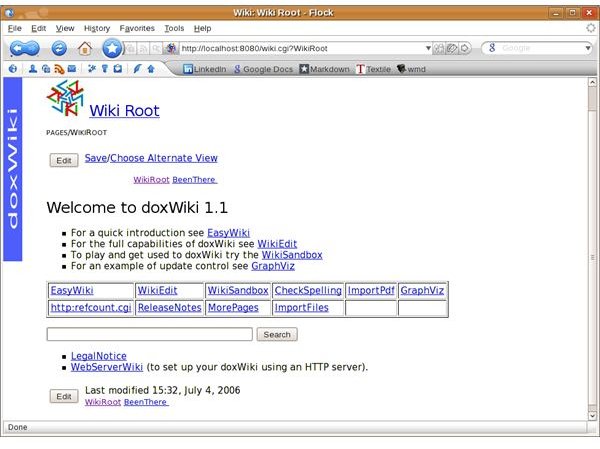
Creating wiki pages is simple. On the main page (called the Wiki Root), you type a name for the new page in the Search field (for example, BrighthubTopics) and then click the Search button. A new page with the name you typed in the Search field appears. From there, click the Edit button to add content.
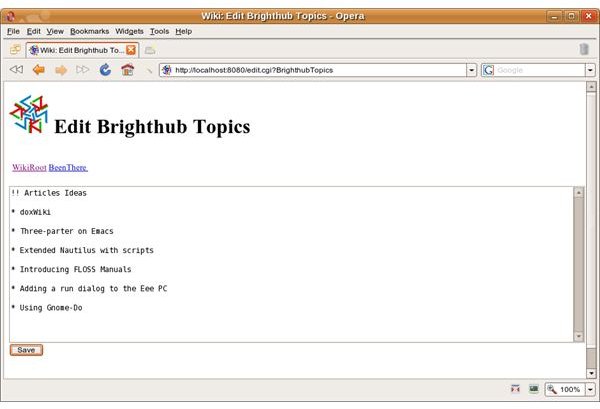
Instead of saving your pages to a database, doxWiki saves the individual files that make up the wiki on your hard drive. The files are small, and it would take a massive wiki to put even come close to putting a dent in the capacity of an older drive, let alone a newer one.
As you’ve probably guessed, doxWiki uses one of the many variants of wiki markup. If you know the markup for a specific wiki, the formatting used by doxWiki is different enough to be confusing at the very least and frustrating at the worst.
Features, features
doxWiki also has a couple of other useful features: a nifty export filter and a search engine. You can save individual pages as HTML which you can later post to the Web, print off, or send via email. While playing with doxWiki, I wrote the first drafts of a couple of articles on the wiki, exported them to HTML, and then completed the final drafts in a text editor.
The search engine is rudimentary, but it gets the job done. The search engine can quickly find a word or term in your wiki, which is useful when it grows to encompass a large number of pages.
One aspect of doxWiki that I don’t like is the default look and feel of the pages. They’re not ugly, but they’re bland. While you can add a custom logo to your wiki pages, I couldn’t find a way to modify the appearance of the wiki pages. It probably involves editing the file DefaultCss but I have a slight aversion to messing with configuration files …
Closing thoughts
doxWiki is light, fast, and easy to use. It’s a good choice for a desktop wiki, or even one on a network. I haven’t tried it on an actual Web server, but it can probably do the job there, too.
This post is part of the series: Bringing Wikis to Your Desktop
Wikis (Web pages that anyone can edit) aren’t just for the Web anymore. With the right software, you can bring the wiki to your Linux desktop. And you can do it without worrying about installing and maintaining complex software, a Web server, and a database. This series shows you how.
