Popular Linux Applications - GnuCash Review
What is GnuCash
GnuCash is a double-entry accounting package that can handle personal as well as business accounting needs. It’s packed with all of the features that have become standard fare for accounting applications. GnuCash is simple to use and highly intuitive.
History
The earliest recorded release of GnuCash was version 1.2.1 on 4/27/2000. This was the first truly stable release of GnuCash. GnuCash is written in C and Scheme, is cross-platform, available for Linux, FreeBSD, Solaris, UNIX, OS X, and Windows. Currently GnuCash is on its 2.2.7 release (as of September 2008).
Features
GnuCash offers a standard double-entry accounting package set of features including:
- Double-entry bookkeeping
- Scheduled Transactions
- Mortgage & Loan Repayment Druid
- Small Business Accounting Features
- OFX, QIF Import
- HBCI Support (disabled in pre-compiled binaries due to licensing conflicts)
- Transaction-Import Matching Support
- (Limited) Multi-User SQL Support
- Multi-Currency Transaction Handling
- Stock/Mutual Fund Portfolios
- Online Stock & Mutual Fund Quotes
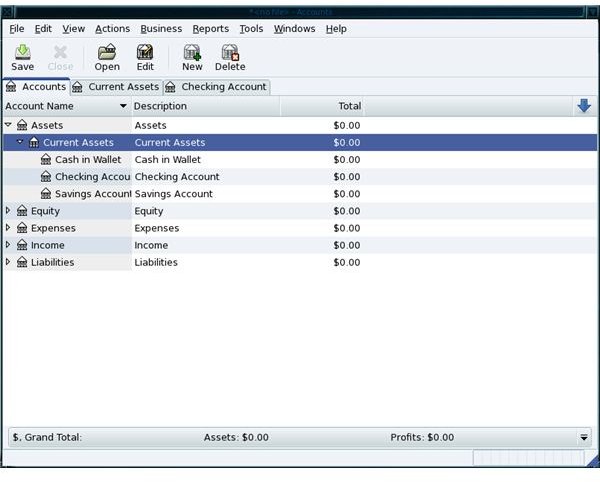
GnuCash features a checkbook-style register that is customizable and will instantly feel familiar to the user. The register supports check and credit card transactions as well as income/stock/currency transactions. GnuCash supports automated transactions, has a tabbed interface to allow multiple accounts to be opened at once, and has a powerful search function.
GnuCash Accounts Window
Getting and Installing
Installing GnuCash is simple. There are two ways to manage this task: via the graphical installation tool or via the command line. To install via the graphical installation open up your installer (Yumex, Synaptic, rpmdrake), do a search for “gnucash”, select the results, and click apply. To install via the command line you will issue one of the following commands (depending upon your distribution):
sudo apt-get install gnucash
Once GnuCash is installed you will find it located in your desktops’ Office menu. If you do not find a menu entry for GnuCash you can open up your desktops’ “Run Command” window (from the main menu) and issue the command gnucash to start the application.
Final Thoughts
I have been using GnuCash for over five years. It has done an outstanding job of handling all of my accounting and financial needs. There are many small to medium businesses that rely on GnuCash as well. So if you’re looking for an accounting package, and you want the security and reliability of Linux - GnuCash is your solution.
This post is part of the series: Linux Applications
In this series I will highlight those Linux applications that are must haves for personal, school, or office use. And once you get to know them, you won’t be able to go without them.
