This handy little network multimeter will save you all kinds of time and money when it comes to troubleshooting network and phones lines.
I love this little yellow box!
I work in Information Technology, in a department where we pretty much do it all. We install hardware and software and even run the cable for the networks that we build from the ground up. Last year, we took on the huge task of moving nearly a hundred people into a new building, and we had to do all the wiring from scratch. That’s our department decided to buy one of these LinkRunner Pro Network Multimeter devices to help with the job, and it really made things a lot easier.
So what exactly is this boxy little thing? It’s a multimeter, which by definition is measuring instrument that combines several functions into one device. In this case, it is a network multimeter that provides several different network diagnostic and testing functions into one device. Basically, this device was designed for troubleshooting network cabling and function.
For the big project that I mentioned earlier, we were moving a bunch of people into an old school building. The school had run some network lines to the classrooms already, but we had to run more to cover the extra people that would occupy the rooms. Furthermore, we needed to test those original lines to see if they were even still working. The building had been hit pretty hard by Katrina, and with weather and wildlife getting to the structure, those soft cables might not have held up so well.
When it comes to testing cabling, from Cat5 Ethernet line to Cat3 Phone lines, this LinkRunner Pro is amazing. Not only will it tell you exactly how long the cable is, but it will also show you how each wire in the cable is punched down. If there is a break in any part of the cable, it will also detect this and show you how far down the line the break is located.
To test the cable, you simple plug the LinkRunner Pro to one end and connect the included Remote Identifier to the other. The Remote Identifier is a little plug about the size of a pair of fingernail clippers, and it doesn’t need any batteries to work. It works with the LinkRunner to send signals back and forth down the line, and this is how it determines length and/or any problems that might be found. If you get one of the kits that Fluke Networks offers, you’ll get six different Remote Identifiers, which can save you a lot of time when you have to test a bunch of cables at once.
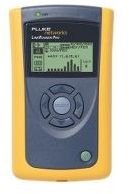
Most of the lines in that old school were good, but we did find a few with problems. A couple of them were completely severed somewhere up in the ceiling where they’d been run. Others had beaks in one or two of the individual cables. We even found one that was intact, but the wires had been crisscrossed so that they never would have worked before. This tester shows you if the lines are crossed or not, so all we had to do was re-punch those cables back down on the block and it worked fine after that.
You see, we were in there testing all those cables long before anybody had moved into the building, so we didn’t have any computer equipment there. Guys were still laying carpet and painting while we were working, so it was not a friendly environment for computers. Without being able to test those lines before people moved in, we’d just be plugging people in and hoping for the best. With this LinkRunner Pro, we knew exactly what needed to be done before we had to climb over anybody’s desk. It’s so much easier to run cables and such when the rooms are empty.
In addition to the line testing functions, this device will also give you information about your network. It’s a great way to figure out if things are not communicating. If you are connecting the line back to a switch, it will show you a visual representation of that switch, give you the cable length of the run, and more. When coupled with a Toner, this device will also help you identify cables when you don’t know to where the other end of it runs, especially when you’ve got a big bundle of them back in your server room.
This network multimeter is housed in a bright yellow case that has a soft rubberized texture that making it easier to hold and less likely to slide off a smooth surface. The LCD display is fairly easy to read and packs a lot of information on its 2 x 1 inch screen. It uses 4 AA batteries, which do last quite a while. We used this thing every day for two weeks before the batteries finally went out.
If you ever have to deal with cable troubleshooting, the LinkRunner Pro is an excellent tool that will save you a lot of time and frustration. It might seem a little expensive on the front end, but this thing really pays for itself when it comes to solving problems in a timely manner. It’s also cool to have strange little toys to play with in front of people who have no idea how any of that network stuff works. The LinkRunner kit currently sells for $895.60 at Amazon.com .


