As the ultimate in Microsoft’s wireless gaming mouse offerings, the Sidewinder X8 has found a niche for itself in hardcore gaming. Based on Microsoft Bluetrack Technology, the Sidewinder X8 is claimed to be much better than other contemporary wireless/optical gaming mice.
Overall Rating (4 out of 5)
Following the success of the SideWinder X5, the Microsoft SideWinder X8 was launched, catering to the ever-increasing demands of gaming enthusiasts. The SideWinder X8 has created a niche for itself in the hardcore gaming segment as the ultimate wireless gaming mouse. What enhances its functionality is the presence of futuristic tracking abilities, courtesy of Microsoft’s BlueTrack Technology . It is the presence of BlueTrack that makes it better than any other contemporary optical or laser mouse being used.
Features (4 out of 5)
To enhance its reputation as the ultimate performance-oriented gaming hardware, the SideWinder X8 provides an unbeatable combination of 4000dpi resolution that is blended with incredible 13,000 frames per second. It offers unbelievable speeds of up to 120 inches per second, and 500Hz USB sampling. The SideWinder X8 also has 2.4 GHz wireless connectivity with the convenience of Play/Charge option that is useful for long-term usage. The cord around the storage cradle has to be unwrapped and snapped on to the mouse’s underside. That lets you charge it while using the mouse and there isn’t even a hint of any performance lag due to this.
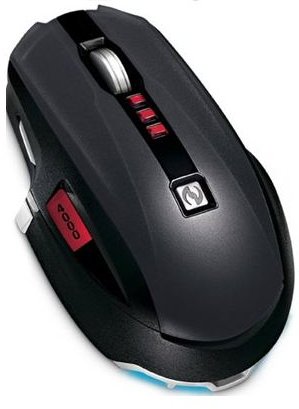
For Gamers - Layout and Functionality (4 out of 5)
The layout is simply superb as the X8 effortlessly combines the functionalities of a wireless receiver, cord wrapper, a charger and a first for this category — the mouse foot container. It resembles a hockey puck which you attach to the bottom of the mouse. It provides a flexible rubber gripping surface for handy movement of the mouse without snarling down the cable when using charge and play. This puck also has exchangeable feet to support customizable gliding.
Every part of the SideWinder X8 has a bit of aesthetic sensibility about it, including the charging cable. It is relatively small and very lightweight and gets guided by the well-concealed magnets within the mouse tip (There is a mouse front dock where cable is magnetically incorporated to provide uniterrupted power supply for extended periods of game fun). Recharging the X8 is seldom an issue, however, as it lasts nearly 30 hours before needing to be charged again, and you can use the play/charge feature if you forget to charge it. Another feature is the provision of replaceable mouse feet which come in three different options.
This feature comes up with the wireless charging puck which provides two extra sets of feet - black being least slippery and white being most slippery. The friction level is easily noticeable in Sidewinder X8 with its high end operational surface. If original feet gets damaged you can use these two sets of feet as backup feet.
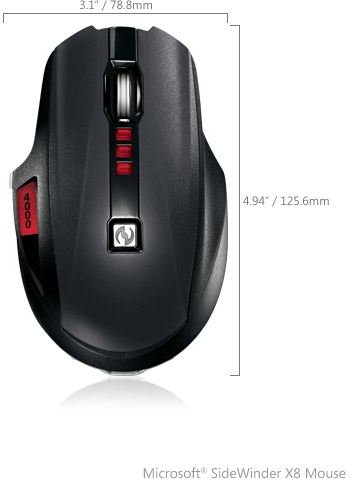
The X8 is a bit smaller than Microsoft’s X5, but it does offer a much better feel and grips ever so comfortably under your palm. The physical aspect is further improved upon by the intelligent design of the thumb buttons that are incredibly well-balanced and reduce the strain that is often felt when gaming for hours. Gamers have been vowing by the SideWinder X8’s precise control that is offered via a more balanced scroll wheel. Side buttons on the vertical side ensure easy access and this also helps to reduce any kind of accidental actuation while pressing hard on the mouse.
Gamers using the X8 have access to a very handy and quick view of the DPI settings and they can choose to switch between different DPI settings with a single click, i.e. high, medium or low. Microsoft has further ensured ease-of-use with the inclusion of a Quick Launch Button, which offers one-touch, spontaneous access to Microsoft’s gaming features .
Conclusion (4 out of 5)
There are a total of 12 buttons on the SideWinder X8 and seven can be personally programmed with a flexible specification of Left/Right tilt wheel to make your gaming experience more personalized. To ensure free play for gamers, USB reporting has been increased to an enormous 500 Hz. There are small red LEDs too, but they don’t stay illuminated for a very long time, and with the overall black background, deliver a smart style effect.
Although intended as a must-have for the die-hard gaming community, the SideWinder X8 is a welcome addition to anyone who wants an all-round mouse that provides an opportunity to experience high-performance, effortless gaming, or can use the precision and comfort for photo or graphics editing, for instance.
To know more about Product Details viz. pricing, features etc. visit Sidewinder X8


