The new 10.1" Acer Aspire One Netbook is one of those rare combinations of great value and great performance. Competition is heating up in the netbook market, and Acer has delivered an improvement on their Aspire One line.
Acer Aspire One 10.1" Netbook
In response to feedback from earlier netbooks in the Aspire One line, Acer made some significant and welcome improvements. Building on an already impressive and highly regarded model, the 10.1" Acer Aspire One is a very handy, high value netbook. While Netbooks cannot do everything a laptop can do [,](https://Netbook is not a laptop, they ) they can do most things that matter for a lot less money.
Dimensions and Weight
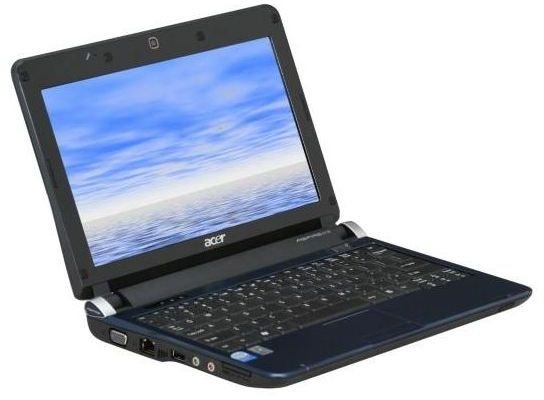
The Acer Aspire One is extremely light, small, and portable. This comes as no surprise since ultraportability is one of the main design principles of a netbook.
- Dimensions: 10.23" x 8.01" x 1.31"
- Weight: 2.9 lbs.
Display (5 out of 5)
The bright and vibrant 10.1" display operates at a default, maximum resolution of 1024 x 768. Colors are vibrant and blacks are pretty good as well. The display is very responsive with no indications of screen lags, blurring, or any other negatives. The Acer Aspire One I reviewed did not have any visible dead pixels, and I have not read about problems in that area.
- Screen Size: 10.1"
- Widescreen: Yes
- Max Resolution: 1024x600
Keyboard (5 out of 5)
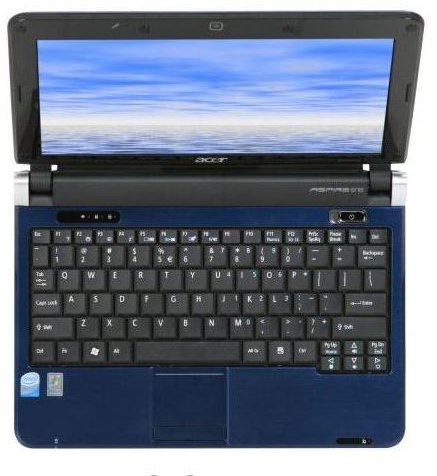
With so many similarities between netbooks, the keyboard layout is one of the most important things to evaluate. All netbooks have to cut corners somewhere to keep size down, and this means there is usually something missing from the keyboard. Acer is one of the best in this area, as they seem to fit everything important into the keyboard.
Of particular note:
-
Full size enter key - I find a small enter key to be one of the most disastrous things you can do to a keyboard. If you have trouble hitting enter, you will have trouble with virtually every task that involves the keyboard.
Advertisement -
Full size shift key on both the left and right sides of the keyboard
-
Full set of independent cursor keys - Some netbooks combine the cursor arrow keys with other important keys. The Acer Aspire One combines them with screen and volume controls (rarely used) and home and end. I personally use home and end quite a bit, but I am aware that they are not widely used keys. It is an interesting point of computer lore that Steve Jobs famously wanted to leave off the cursor arrow keys from the Macintosh. He felt the mouse could do it all. Feedback was enormously negative so he put them back. Never underestimate the degree to which end users like their cursor arrow keys!
Advertisement -
Independent function keys - I really like the fact that you get independent function keys that are the default behavior for those keys. I dislike having to turn on a “function lock” to turn number or other keys into my function keys.
-
Independent INSERT and DELETE. While not widely utilized, these are very handy keys to have on their own rather than operating by also holding down a “Fn” key.
Advertisement -
Full size, well located [ { } ] | \ keys. For programmers, these keys are extremely vital (especially { and } ). I am very glad they kept programmers in mind when laying out the keyboard.
-
Textured windows key - there is a textured windows logo on the windows key that helps you avoid it when you want ctrl, alt, or the Fn key. Further, if you really want the Windows key, it is easy to find. Early beta reports on Windows 7 indicate that the windows key is utilized in a lot of new, handy keyboard shortcuts. It would appear Acer has the head start on making it convenient to use them.
Advertisement
Connectivity (4 out of 5)
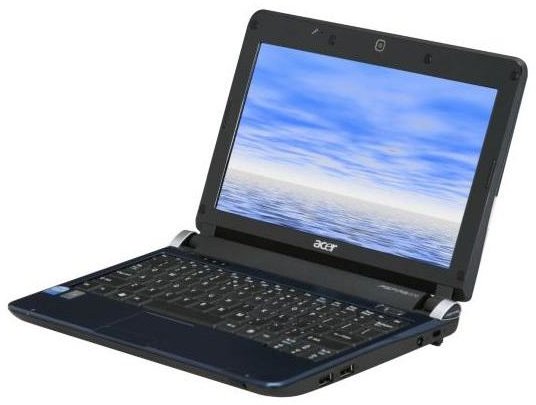
The Acer Aspire One provides wired and wireless ethernet that both work as expected. USB connectivity to a mobile phone also works well provided you have a phone that handles the task effectively. The only thing missing here is built in Bluetooth. There are a few netbooks that have this, and it would certainly be nice to have on the Acer Aspire One.
- LAN: 10/100Mbps
- WLAN: 802.11b/g Wireless LAN
Performance (5 out of 5)
Netbook performance is relatively similar across the board due to similar hardware. The Acer Aspire One is equipped with the Intel Atom Processor, 1 gig of ram, and a 160 gig HD. They are optimized well to load and run basic windows software rapidly. Online videos and DVDs also play nicely with no evident lags or delays. Further optimization can be done by the end user, but is certainly not necessary. The Acer Aspire One performs marvelously well at the tasks it is designed for.
Processor:
- CPU Type: Intel Atom
- CPU Speed: N270(1.60GHz)
- CPU FSB: 533MHz
- CPU L2 Cache: 512KB
Hard Drive:
- HDD: 160 GB
- Hard Drive RPM: 5400 RPM
- Hard Drive Interface: SATA
Trackpad (2 out of 5)
The trackpad is the one area where the Acer Aspire One fails to deliver. The pad itself works pretty well. It is very responsive, double tap responsiveness is just right, the right side works as a scroll bar, etc.
But the button for mouse clicks is terrible. The Acer uses a single button that is pressed on the left or right side for left or right clicks. The button is extremely stiff and required more than expected effort to depress. Any tasks that require click, hold, and drag are very difficult to perform.
I highly recommend the use of an external mouse with the Acer. If this is not an option for you, and you know you make heavy use of the trackpad while portable computing, this is probably not the best netbook choice. Most netbook users are performing primarily keyboard heavy tasks (writing in particular) so this is not much of an issue.
Ports
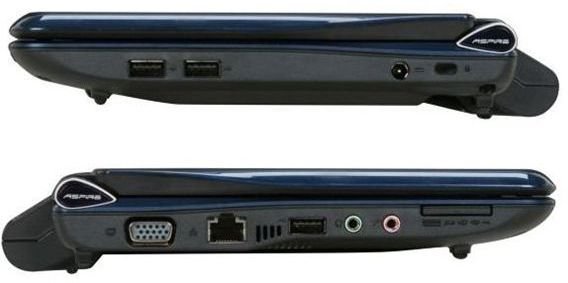
The Acer Aspire One includes the following ports:
- USB: 3
- Video Ports: 1 x VGA
- Audio Ports: 1 x Headphone/Speaker/Line-Out Jack, 1 x Microphone-in Jack
Battery Life (5 out of 5)
Acer packed an impressive new battery into this machine. It is estimated to provide close to 7 hours of battery life and my own field tests verify this to be relatively accurate. I got at least 5 to 6 hours of use per charge without tinkering with any power optimization features.
- Battery: 6-cell lithium ion
Operating System
The Acer Aspire One 10.1" comes with Windows XP. This means virtually all your standard Windows applications will run on the machine. It does not have an internal CDROM drive (I don’t know of a single netbook that does), so you will need to install applications over the internet, USB, an external CDROM drive, or a local network.
Pre-Installed Software
The Acer Aspire One 10.1" comes pre-installed with Microsoft Works, a Microsoft Office 60 day trial, and a variety of other trial software packages. Frankly, I find pre-installed software to be a tremendous annoyance. Some stores (like Best Buy) actually make another $50-100 per netbook for an “optimization” service that is largely the removal of all this drek. I understand that these companies pay to have their software pre-installed, so I accept that it helps keep the price down. But I do not have to like it.
Other Features
Netbook Camera: Acer Crystal Eye webcam
Graphics Processor: Intel GMA950 (uses shared system memory)
Audio: High-Definition Audio Support
Speaker: Built-in stereo speakers
Card Reader: Multi-in-one card reader (Supports: MultiMediaCard, Reduced-Size MultiMediaCard, Secure Digital, Memory Stick, Memory Stick PRO or xD-Picture Card. Optional adapter supports: Memory Stick Duo, Memory Stick PRO Duo, miniSD, microSD)
Overall Rating (5 out of 5)
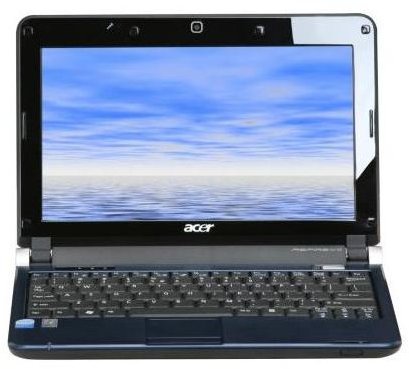
I doubt it comes as a surprise that I found the Acer Aspire One 10.1" to be an excellent machine. The keyboard, display, overall performance, connectivity and port options, and more were all done very well. The only problem with the machine right now is the trackpad button. I must stress that if you know you will rely heavily on click-drag-hold actions (Photoshop editing, though a netbook is poorly suited to that task anyway) this is not the netbook for you. If you only need the trackpad for navigation and pointing, if you can use an external mouse, or if you primarily use the keyboard, you really cannot go wrong with this netbook - even for gaming ! It is an excellent machine at an excellent price.


