The Logitech V450 nano cordless laser mouse is a very satisfactory solution to some common wireless mouse problems. Bright Hub’s review looks at features and user reaction.
Why I needed a new mouse
One day last summer I had a mind opening experience, although I did not realize it then. At the time, I was sure it was a tragedy. I was sitting on the couch at my sister’s house editing an article for publication on Bright Hub, with my laptop computer on my lap, plugged into an extension cord, with the AC adapter cord hanging down to the floor, as was the cord for the mouse. I put the laptop down on the couch and stood up to walk into the kitchen. I took a large step to clear the extension cord, and snagged the mouse cord with my foot without realizing it. One further step, and the computer and I were on the floor. After picking myself and the laptop up, I sat down again and tried to turn it on. It was dead.
I decided I would never use a wired mouse again. I haven’t. I learned, with the help of an article on putting your internal hard drive into an external enclosure and several emails from fellow Bright Hub contributing editor Lamar Stonecypher, that I could remove my hard drive, put it into an enclosure, and rescue documents and pictures from my scrambled hard drive. I replaced the hard drive in my laptop with the help of the Dell manual, reinstalled Vista, and used the touch pad to order a cordless mouse.
I got the Logitech V220 notebook mouse, in bright red, to match my resurrected laptop. The mouse felt great. It fit my hand better than my old mouse ever had, and it came with a mini receiver that stuck out of the USB about an inch and a half. I loved it. There was no way I would ever trip over that! And I never did. However, over the space of the next five months, I managed to break off the
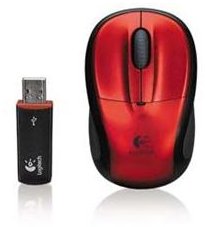
receiver three times. Once I put it into the laptop bag without removing the receiver. When I pulled it out, it was at a 45 degree angle, and when I tugged on it, the plastic case case came off in my hand. Another time I was using the laptop in bed, because I had a cold, and the receiver caught in the sheets and bent at a 60 degree angle. That time the case stayed on it for a day or so. The last time, I knocked the receiver against the side of the couch and the plastic case came off completely. Luckily, Logitech will let you order a new receiver for $10. After the third time, I decided that there had to be a better solution.
Logitech V450 Nano Mouse stock photos- jet black and red
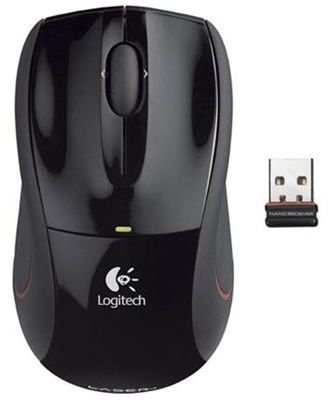
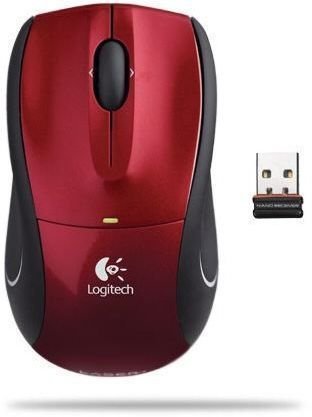
Logitech V450 nano cordless laser mouse (5 out of 5)
I went to the Newegg site and looked through all the cordless mice they had. It seemed that there were mice with smaller wireless receivers now. I found one that looked like the receiver was about an inch long, and hoped it would be less fragile. However, it was blue and gray, so I clicked onto the next page, looking for one that matched my laptop better. In the middle of the page, I saw the Logitech V450 nano mouse.
Specifications said the wireless receiver, when plugged into the USB port, only stuck out a quarter inch. The description said it could be left in
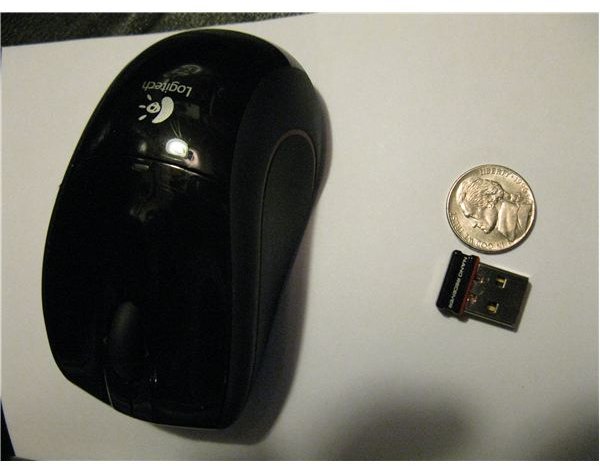
the laptop all the time, without getting damaged. They even had a red one - but they were out of it. The other option was jet black, with a red side stripe. It was a little different in shape than my old mouse, but was also described as notebook sized. I went ahead and ordered the black one, for $42.99. Newegg ships quickly, and I received it about 2 days later.
The Logitech V450 Nano Mouse has the tiniest wireless receiver I have ever seen. It really does just stick out a mere quarter inch. My previous mouse was an optical mouse, which was a step up from the wired ball mouse I had started with, but the responsiveness of the laser mouse was definitely better. I also had much finer control over where the cursor went. I found it was possible to sign my name in paint using the mouse.
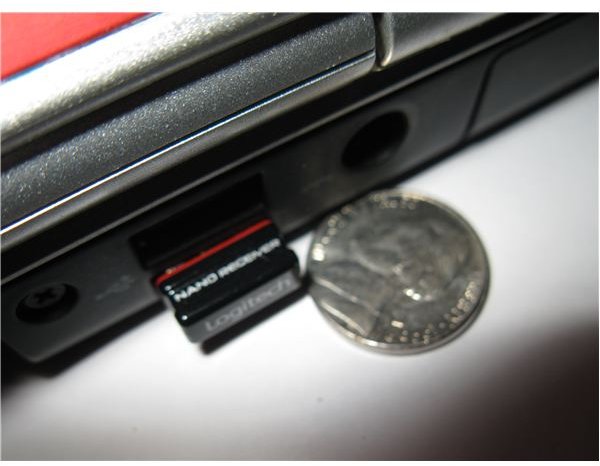
The wireless receiver now lives in the back of my laptop. My laptop slips in and out of the laptop bag without snagging. It rests on the blankets on the bed without the receiver ever budging. And it has hit the arm of the couch several times. Nothing fazes it.
There is a switch on the bottom of the mouse to power off the mouse, although the packaging said the battery could last up to a year. If you do want to remove the receiver, there is a place inside the battery lid to store the receiver, but I never bother. It is 2.4 GHz wireless, which documentation says gives speeds up to 300 times faster than other mice. I certainly have noticed no lag in using it, even with the laptop across the room and attached to the TV.
The Logitech V450 is a three button mouse, with the scroll wheel as the third button. It feels solid in the hand, and the sides are slightly rubbery, which gives a nice grip. The scroll wheel doesn’t feel flimsy, and all of the buttons have a nice clicking sound when you use them, although the scroll wheel button is a little stiffer to push. It is a tilt wheel, if you use the provided software, for side to side scrolling, and the scroll wheel can go click by click or spin freely to move you an amazing distance down a page.
The mouse is plug and play, and can be used on any Windows or Mac machine. It also works on my Linux netbook, although Logitech does not list Linux as one of the supported OS. It came with a CD for drivers, although I have not needed to use it. However, the software on the CD does allow you to program the third button. A user complaint about the provided software is that it takes up 60 mb. This does seem excessive for drivers for a mouse that is already plug and play.
If your mouse does not find your computer when you first insert the receiver, the on/off button on the bottom of the mouse can be pushed in slightly to search for the wireless connection. There is a small green LED indicating the mouse is on, and another green LED lights up on the top of the mouse when it is looking for a wireless connection.
The red stripe on the side of the mouse follows the curve of the top, almost like a racing stripe on a car. It actually seems to be an embedded piece of red plastic, and goes across the front of the mouse as well. A toggle switch on the bottom of the mouse opens the battery cover, which is on the top of the mouse where the middle of your palm rests. The mouse bottom has four very slightly raised plastic pads, which it glides on over practically any surface. The documentation does say that it will not work well on a glass or mirrored surface.
It is slightly larger than my previous optical cordless notebook mouse, and slightly more squared off. While it is smaller than most desktop mice, it is not sized for a child. It is 4 x 2.24 x 1.5 inches, and comes with a 3 year warranty.
Logitech also provides the option of using the mouse with your desktop computer - feasible even for people without smaller hands, because it is not really a mini mouse. For those wishing to use the mouse on their desktop, Logitech provides a USB extension cord, allowing the cord to be plugged into the back of your desktop, but the receiver to be accessible from the front. This does really negate the point of the nano receiver, but does give you the capacity of a smaller cordless laser mouse. However, I must point out that there are comparable cordless laser mice at a lower price, if you are not interested in the nano receiver. If I ever move back to using a desktop computer, I will set my jet black nano mouse up with it, and get myself the red nano that will match my laptop.
The mouse itself has fallen on a hardwood floor several times without any damage. Even the battery cover did not pop off.
Conclusion (5 out of 5)
Overall, I am extremely satisfied with this purchase. I have a cordless mouse with a nano wireless receiver, eliminating problems of the receiver breaking inadvertently, and it is a very sturdy comfortable mouse with laser responsiveness. User reviews were almost completely ecstatic.
It is priced higher than I would prefer. Online sources currently list it at prices ranging from $35 to $50 USD, but one user said he had gotten his for $31. The price and the size of the drivers were really the only issues raised by users.


