In the last couple of years, cordless input devices have seen a steady melioration in design and features. Input Desktop devices have now become cordless and have incorporated new features that makes navigation within Windows a piece of cake. The new Logitech MX 5500 Revolution is one such device.
Features (5 out of 5)
Keyboard
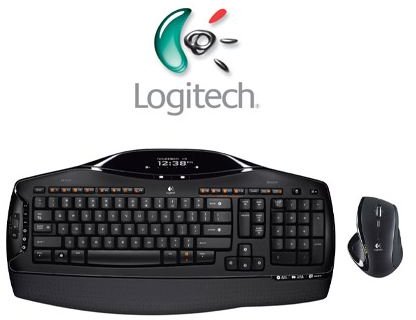
The Logitech MX 5500 Revolution consists of a wireless mouse and a wireless keyboard connected through a Bluetooth connection. It is very easy to set up and takes just a few moments.
The keyboard is powered by four AA batteries and the mouse is preloaded with rechargeable batteries which can be charged via the charging hub included in the device package.
The keyboard has a beautiful LCD display on its top and it gives you all the information about the current song that is being played, the temperature of your room, it even tells you the number of unread emails you have, and also has a calculator. It displays the date and time in the default mode or when the keyboard is idle.
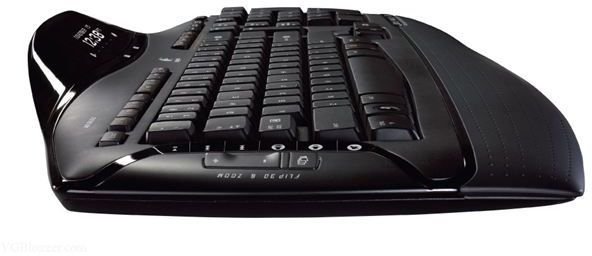
The keyboard has a thin rubber non-removable attachment at the bottom which is very comfortable and allows you to rest your palm while you are typing. there are a lot of people who get annoyed by the sound of typing. You don’t have to worry about your room mate getting disturbed as the MX 5500 is a very silent device and the sound produced while typing is almost negligible.
If you look at the keyboard you will find numerous additional keys compared to the traditional keyboard. There are lots of shortcut keys to the windows interface and function keys are pre-allotted with various shortcuts which when pressed with a combination key will open up almost anything on your desktop. There are shortcut keys for bringing up Microsoft Office documents, opening up messengers, checking your email via the e-mail client, opening up the default web browser and even the search application.
Media control keys like volume and mute are excellent. There is a Flip-3D button included in the keyboard that works as a replacement of the [Alt]-[Tab] shortcut, enabling you to flip through multiple opened documents or applications, while the zoom in and zoom out keys play the role of selection buttons.
The device package also includes utility software called SetPoint to tune up the input device. Using this application any number of shortcut keys can be reassigned to suit your needs.
Mouse
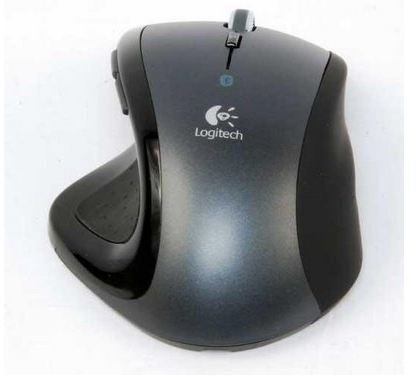
The mouse is designed even better than the keyboard and compliments it in both design and features. Gamers will love this laser mouse as it fits snugly in the palm giving you excellent control and delivering precise results.
The best thing about the mouse is its scroll wheel that lets you sail through documents with its free scrolling feature, as well as allowing you to switch to the normal scroll mode whenever you want. There is a one-touch search button just below the scroll wheel that opens up your default Internet browser with your selected search engine.
On the right side of the mouse there is a set of forward and back buttons that help you browse the forward and backward link of your browser. Just next to the forward and back buttons you will also find the unique document flip slider which delivers the same functions as the Flip-3D button on the keyboard, which has already been discussed above.
Along with all these useful buttons there is also a power switch that enables you to switch off your mouse effortlessly, whenever it is not in use, allowing you to save battery life.
Performance (5 out of 5)
I found the wireless connectivity of both the devices to be excellent, and they connect without any hassle in an operational range of about 30 meters. The keys are very well laid out and spacious, enabling the user to type fast and with ease.
The Num lock has been excluded so that you don’t accidentally overwrite your precious data while trying to type numbers. The performance offered by the mouse is even better and has improved accuracy over traditional mice.
However, there is a slight issue that the MX 5500 Revolution has rather small function keys with the [Print screen], [Insert] and [Pause] keys shifted above the number pad.
Otherwise, this device is a great performer and is built keeping elegance and precision in mind.
Value for money (2 out of 5)
The set is quite expensive compared to normal set of input device, running at about $200 USD , and is a mere luxury. It is an item of desire and in reach of a few lucky ones who can afford it.
Conclusion (4 out of 5)
The Logitech MX 5500 Revolution has an excellent design and great features with a good wireless range. It offers great performance and is a must have for avid gamers, movie enthusiasts and those who want nothing but the best. It may come at a price that alienates the general user market, and certainly won’t be a viable product for the generic family environment or business need, however if money is not a problem for you, and you are an extensive media buff or gamer, then go for it.
Specifications
Dimensions: Keyboard – 480 x 44 x 240 mm; Mouse – 85 x 42 x 120 mm
Weight: Keyboard – 984 grams; Mouse – 147 grams
Tracking: Laser
Resolution: 800 dpi
Wireless receiver: Bluetooth 2.0 EDR USB adapter
Connectivity: USB 2.0
Battery type: AA
Compatibility: Microsoft Windows XP, Windows Vista


