Review of HP Photosmart C4480 - Compact, Budget, Multifunction Printing
Overview of the HP C4480
The multi-function printers in Hewlett-Packard’s Photosmart line have become quite popular among those looking for a device that’s capable of printing high-quality photographs in addition to traditional printing, copying, and scanning of documents. Although the range of features (and associated prices) of the models in this line make it a little difficult to give a simple linear explanation detailing which is “better” than the other, it’s clear that the HP Photosmart C4480 is meant to be the budget model in this series with its suggested retail price of $99.
Weighing in at 11.16 pounds and measuring 17.09 x 11.42 x 6.38 inches, the HP C4480 is compact enough that most users will have no trouble finding a permanent place for the printer on their desk or in their work area. It’s still a bit too heavy, in my eyes, to be considered a mobile unit, but it might be able to function as such if you’re really in a pinch.
Despite the focus on its photo printing capabilities, the HP C4480 is a true all-in-one device that features both color and black-and-white printing, scanning, and copying functions. The printer is compatible with Windows Vista, both the 32 and 64-bit versions, as well as Windows XP and Mac OS X 10.3.9, 10.4, and 10.5.
Performance (4 out of 5)
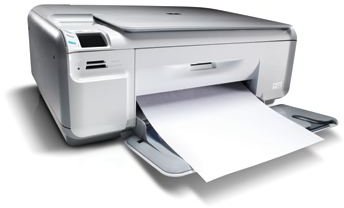
If you do massive amounts of printing, you’re really better off going with a laser printer over almost any type of inkjet. With that being said, you still don’t want to sit around and wait all day for your documents to print. The HP C4480 performs adequately in this regard, printing or copying up to 30 pages per minute in black-and-white mode and up to 23 pages per minute in color.
This may not be the lightning speed found in larger office printers, but it’s definitely fast enough for most home users. Plus, the device is extremely quiet – that’s a great bonus for those of us who do most of our work at night when everyone else is asleep. If you want two-sided (duplex) printing, you will have to do that manually.
A USB connection is required for this device, so if you do decide to buy, don’t forget to pick up another cable if you don’t have a spare somewhere around the house. While the printer does come packaged with basic ink cartridges and all other power cords, the USB cable does need to be purchased separately.
Ink Cartridges (4 out of 5)
Before any printer can truly be considered as part of a “budget” line, you have to take the price of compatible ink cartridges into account. The HP C4480 uses the HP 74 Black, HP 75 Tri-Color, and HP 99 Photo cartridges. The printer comes equipped with one black cartridge and one tri-color cartridge, but if you want to start printing high-quality photos right away, make sure to add the HP 99 to your shopping list as well.
While the standard prices of the HP 74 and HP 75 cartridges seem a little on the high side at first, it’s good to note that there are XL versions of these available. For twice the price of a standard cartridge, you can pick up an XL version which will print more than three times the number of pages. That makes the whole ink cartridge deal for this device look a lot nicer.
In the end, you can expect to get about 700-750 pages from the HP 74XL Black for $31.99, 490-520 pages from the HP 75XL Tri-Color for $37.99, and 120-130 photos from the HP 99 for $26.99.
Photo Printing Capabilities (4 out of 5)
One of the main highpoints of the HP C4480 is its photo printing capabilities. The device supports full borderless printing for photos up to 8.5 x 11 inches in size, and you can print directly from supported memory cards without having to load the photos to your PC. The memory cards supported are Memory Stick, Memory Stick Duo, Secure Digital/Multimedia Card, Secure Digital High Capacity Card, and xD-Picture Card. I wouldn’t mind seeing a bit more variety here, but at least the basics are covered.
Assuming you use the proper ink cartridge and special photo papers for your prints, the photos come out very nicely – perhaps not as nice as having them professionally done, but the quality is excellent considering this is a budget printer.
Overall Rating (4 out of 5)
Are you looking for the best printer that money can buy, or are you restricted to looking for the best that $100 can buy? If you have a bigger budget, you’d be better off going with the HP CM1017 or another model from the best multi-function printer under $500 list. Better yet, if you want to stay in the Photosmart line and can manage the higher price, check out the HP Photosmart C8180.
However, if cost is a major concern, as it is with many people, you’ll be hard-pressed to find a better compact all-in-one printer than the HP Photosmart C4480 while staying under $100. If you shop around a bit, you should be able to find it for even less than that, both online and in major retail stores.
Don’t forget to check out Bright Hub’s collection of best printer reviews to get all the details on other top photo printers on the market today.
