Lost data on a jump drive is a common problem for many computer users. If you are one of them, then continue reading this article to learn how to fix the issue. Also you can learn what the causes for such uncomfortable data losses are.
Lost data on a Jump drive is a common problem for many computer users. There are several reasons for this issue. Hardware errors, virus attacks, power outages, Physical Damages**,** and accidentally deletions are the most common reasons for data losses on Jump drives. If your Jump drive is not recognized after such a data loss then you have to correct it first.
Hardware Errors
Hardware errors are the most common reasons for data loss on USB drives. Due to excessive usage, frequent formatting, etc. hardware errors may occur. Sometimes these errors may be severe damages. Then it is difficult to recover data using a cheaper option like using data recovery software. In such cases it might be necessary to get the help of a professional data recovery service. If the damage is not that severe, you might be able to repair it using tools in the operating system itself. In most cases lost data on a jump drive can be recovered using Windows disk checking utility.
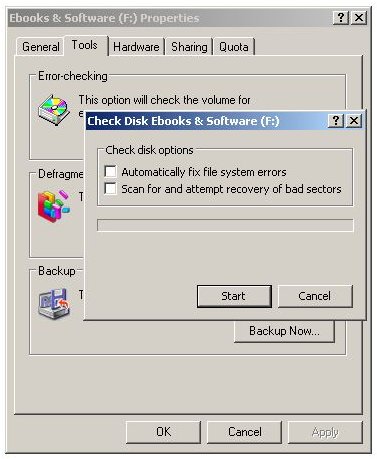
Simply right click on the icon of the jump drive and go to Properties, Tools tab, and then click Check Now in Error checking. Check both options (Automatically fix file system errors and scan for and attempt recovery of bad sectors) and click Start. The tool will try to repair your USB drive. If it managed to do that, your data will be restored.
Virus attacks
Virus attacks are another serious issue when it comes to Jump drives. Many data losses and damages are due to computer viruses. Best solution is to use an updated virus scanner to remove the virus on the Jump drive. There are many viruses that hide or make it difficult to use your files and folders. Sometimes you might think this is data loss. Use a good virus scanner and you’ll find it is not data loss in most cases.
One of the main reasons for the virus attacks is the Auto run feature of USB flash drives. If you can stop auto run you can stop virus attacks to a certain extent.
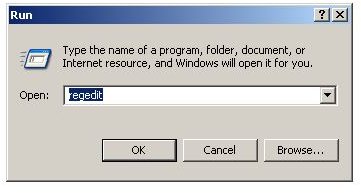
- Use the following registry key to disable auto run in Windows. Go to Start > Run in Windows XP or click Start and type the following command in the search bar in Windows Vista or Windows 7 to start Registry Editor. Make sure to backup your registry before doing this. (In Registry Editor File > Export > Save)
- Type Regedit
- Then browse to the following key.
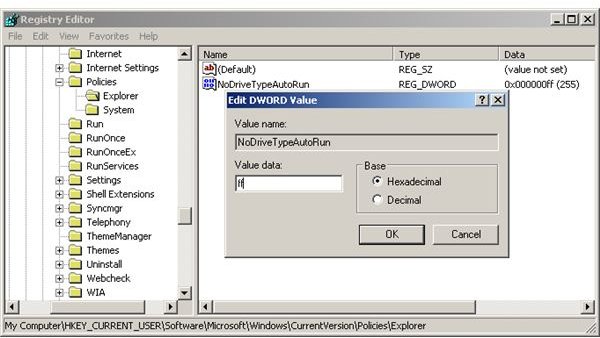
- HKEY_CURRENT_USER\Software\Microsoft\Windows\CurrentVersion\Policies\Explorer
- Modify the value of NoDriveTypeAutoRun to ff (hexadecimal)
You can use Panda USB Vaccine tool to prevent virus infection to your jump drives.
Images
Power Outages
Sometimes lost data on a Jump drive may occur due to power outages. In these cases your Jump drive may get damaged permanently making it impossible to get data back. As a result of low quality power supplies and errors in the positioning of USB power cables such damage may occur. Best thing is not to use your USB drives in a computer known for burning Jump drives. Use of proper cabling and a good power supply is necessary to improve the life of all your hardware components in the computer.
Physical Damages
Another possible cause for data losses in USB flash drives is physical damage. Fire or high temperature, water, and any other physical damage may cause data loss. If you have important data in it, then it’s your responsibility to handle the jump drive with care.
Accidently Deleted Files
Occasionally your files might get deleted accidentally. In this case you can get the help of data recovery software that supports USB flash drives. Recover My Files is one of the best in the business.
Just plug in the jump drive and use the software for a Complete File Search. Then select jump drive, then select file types to search and finally Start search. Then you can easily recover your lost data. Here you can find a detailed guide about how to recover lost USB flash drive data using Recover My Files.
If you use your jump drive with care, then there is less risk of data loss. In case of lost data on your Jump drive try to use data recovery software like Recover My Files to get data back.


