Getting your video card to work flawlessly should be a simple task; assuming your hardware is new and not faulty, all you need is the right driver software. Read on for instructions on downloading and installing.
Graphics and You
After installing a new video card on your system it will likely cause instability, problems with the display or it won’t work as you’ve expected. The main cause is outdated or incompatible video card drivers; in most cases they are included on a disc accompanying the card, which instantly solves your woes.
In case you have purchased a second-hand card or one without drivers included, you can retain system stability and get your GPU working by updating them. This is done by visiting your card manufacturer’s website and accessing the download section.
Release dates are displayed next to the name of the driver, being the driver’s version (i.e. a number such as 10.2), so you will always know what to download. At times you can revert to an older version, known as “rolling back,” if you find the newly released one unstable.
Keep reading for details on picking the right drivers for your video card, and finally getting everything working again.
First Things First - Finding Your Display Adapter
There are a number of ways to access “Device Manager” on your PC, one being:
- Click “Start”
-
Click on the “Run” icon, which opens up the command prompt window
Advertisement -
In the prompt, copy and paste “devmgmt.msc” and the device manager panel will open
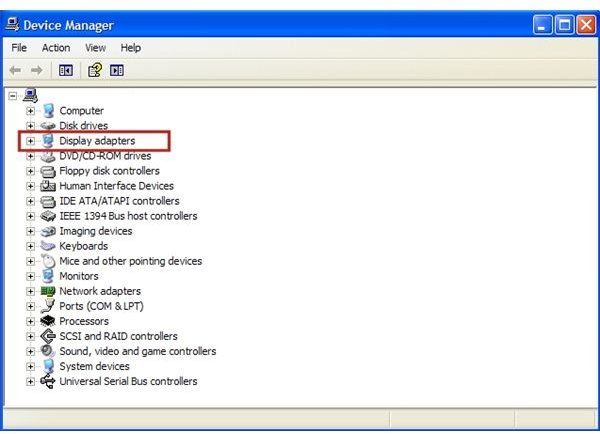
For another way of accessing “Device Manager:"
-
Go to “My Computer,” right-click, then select “Properties.” If you don’t have a shortcut of “My Computer” on your desktop, go to “Control Panel” (on Start) and click on “System” to access it.
Advertisement -
You should see a tab at the very top of the opened window named “Hardware:" click on it.
-
Next click on “Device Manager," just underneath the tab under the “Device Manager” heading.
Advertisement -
You will now see a list of everything installed on your computer
-
Go to the “Display Adapters” menu and click on the small cross on your left-hand side.
Advertisement -
Underneath is the name of your display device installed.
Both ways are good, depending on what you find easier.
Downloading Drivers
Now that you know which model you have you can go to the manufacturer’s website and search for the drivers you need. There is often a download section, then drop-down menus where you can select your operating system and your card model.
As an example, if you have an Nvidia video card you can go to the Nvidia.com site; downloading a driver is as simple as selecting “Download Drivers” at the top, then selecting the model of video card you have. You’ll then be taken to the approriate download for your video card drivers.
Note that if you have an older card, such as an AGP model or one that has been withdrawn from production, the drivers may be listed in a section named “Archive” or similar. In case you don’t find such a section contact the company directly who will shed further light or direct you to a trustworthy download site.
After you have selected your driver, wait for it to download and save it to a location which you will remember.
Final Steps - Installing Your Drivers
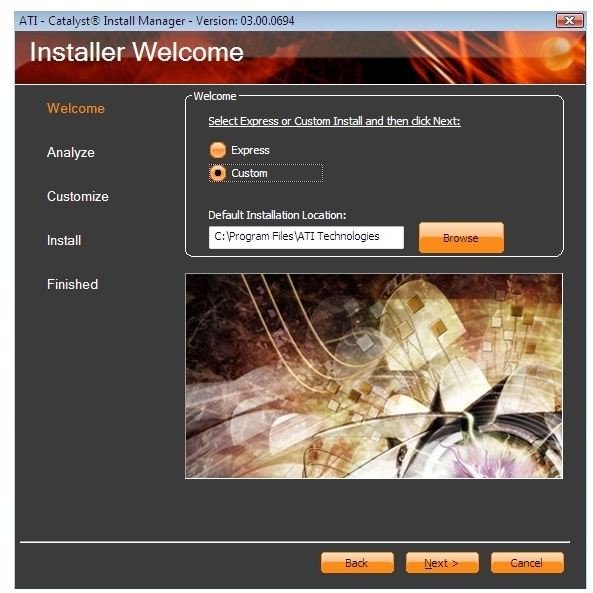
Before installing, uninstall your current device drivers so there are no conflicts. Follow the steps above to go to your display adapter again.
Now right-click on the name of your card and select “Uninstall." You will have to reboot, and upon doing so your display resolution will definitely revert to a low default setting, such as 800 x 600 pixels. You haven’t broken anything, don’t worry: that’s normal.
Find and open the self-installer you’ve downloaded and wait for the installation of new drivers to finish. The installation process may take 5 or 10 minutes, during which your screen may flicker, your monitor may become unresponsive or similar things: again it’s normal, just wait for it to finish. Once it’s completed, restart your computer and then change your resolution back according to your preferences or display capabilities.
Congratulations, that’s it! You’ve finally installed the right video card drivers. Simply go through this process again when the manufacturer of your video card puts out the next driver-release.
Free Alternative - Using Device Doctor

Another useful way to determine which drivers are missing from your system is Device Doctor , a freeware program which speeds up the process and does all of the work. The program will not only inform you of outdated video card drivers, but will also list drivers for your motherboard, system devices and more; lastly, and most importantly, the program will link you to downloads of the listed drivers.
This program is quite useful in case you feel overwhelmed by the manual approach. However, do bear in mind that Device Doctor lists drivers with a priority on their release date; in the case of an upgrade a newer driver may not be needed, and you can always roll back and keep the old one if it works best.
References/Images
Wikimedia commons - commons.wikimedia.org
Device Doctor site - www.devicedoctor.com
Writer’s own experience


