How Can I Fix My Sound Card - How To Detect My Sound Card
How Can I Fix My Sound Card?
Sound card issues can occur without warning and for apparently no reason – typically you should only have problems of this kind after installing Windows on a PC, where the easiest solution is to use your PCs motherboard driver disc to install the correct software for your sound card.
However there isn’t a button in Windows that says “Can you help me reinstall the sound on my computer?” Getting Windows to recognise that there is no sound card installed is half the battle.
Once you’ve established whether Windows is aware of the sound card, it’s a simple task to fix this by installing the correct drivers.
Identifying Your Sound Card
Different devices use different types of sound cards. A laptop computer will have an integrated sound chip, whereas a desktop PC can have either an integrated chip or a PCI slot sound card.
Problems with sound cards and their installation can often be down to how they have been fitted.
If you’re inclined and familiar with the internal workings of a PC, a lot of trouble later on can be avoided by switching off your PC, unplugging all mains electric devices from it, opening your PC case, unscrewing the catch on your sound card and removing it from the slot before checking for dust and debris and replacing it, applying firm (but not excessive) pressure in order to push it home.
Don’t forget to replace the screw and your PC case door!
(Further information on this can be found by going to Start > Help and searching for “how can I fix my sound card”.)
Detecting the Sound Card
To check whether your PC has recognised your sound card or chip, right-click My Computer and choose Properties from the context menu.
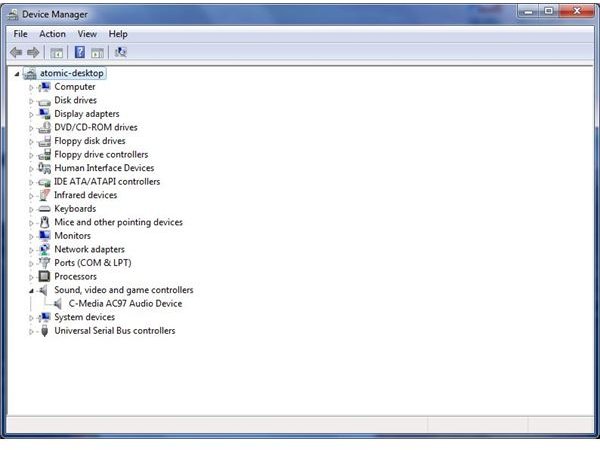
Find the Device Manager button (left menu in Windows 7, Hardware tab in Windows XP) and look for Sound, video and game controllers.
Expand this list – if the sound card has a conflict or an incorrect driver installed, the device will have a yellow triangle with an exclamation mark against it.
If no sound card is visible, go to Action > Scan for hardware changes to have Windows check all hardware.
This last step should resolve the majority of issues and force Windows to begin installing a sound card driver. In the event that no sound device is detected, you should reboot into Safe Mode and try again. Failure here would indicate a fault with your sound card which might be either damaged or incorrectly fitted into the PCI slot.
Finding Sound Card Drivers
After Windows has checked all of the connected hardware, it should detect your sound card and either search the Windows files for the correct driver or ask for you to insert the correct driver disc.
There are three typical sources for sound card drivers:
• Windows disc
• Motherboard disc
• Sound card driver disc
Additionally, Windows Update should be able to find the correct drivers for you device.
More often than not, if the sound driver has not been installed and using the Scan for hardware changes has detected your device but failed to install the software then it is likely that Windows doesn’t have a compatible sound card driver.
At this stage, you will need to check the disc for your motherboard (particularly for users with bespoke PCs or home builds) or check the sound card driver disc.
Note that a compatible driver must be one designed for use with both your sound card and your operating system – also note that compatibility with Windows Vista does not necessarily equate to compatibility with Windows 7. In this situation you should check the website of the sound card manufacturer to determine whether or not there are additional drivers available to suit your operating system.
