Laptop Hard Drive Retrieval Instructions & Hardware
Detecting a Damaged or Dying Hard Disk Drive
A damaged or worn out laptop hard disk drive (HDD) can be detected early by the user noticing changes in the laptops performance.
Such changes include:
- Slow or sluggish performance
- A rapid clicking or ticking sound when running programs
- Failure messages when copy or deleting files
A common attempt at fixing these issues is by running a disk defrag job (In Windows XP this is Start > Programs Accessories > System Tools > Disk Defragmenter) and this can give your disk an extra lease of life – but only one that should be used to make preparations for an ever impending end.
All is not lost – with a successful defragmentation task completed, data on your drive has been reorganized which short term will reduce wear and tear on the moving parts in the drive – and give you the chance to retrieve vital files.
Moving the Laptop Hard Drive - Preparation
Consider the question - where are you moving the files to?
Saving to any device attached to your laptop will involve unnecessary extra work for your already tired hard disk drive. Whether a USB flash drive or a CD or DVD, the hard drive will still be running twice as much as it needs to for standard reading – once to read the data and again to send it to the external device.
By removing your HDD and connecting it directly to a PC you can quickly and effectively remove your required files from the device – a great way of avoiding a data disaster.
Connect Your Laptop HDD to Your PC
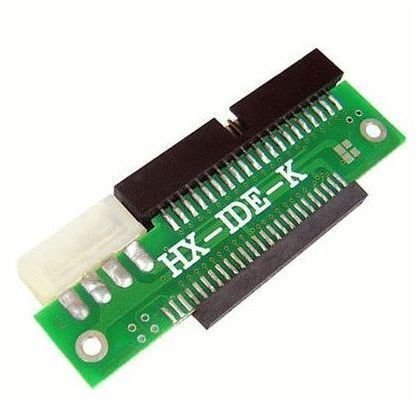
There are a couple of different solutions to retrieving data from a dying laptop HDD. One is to use an adapter to connect your laptop 2.5” HDD IDE connector to your PC’s 3.5 HDD IDE connector; this is a quick solution that can be used if you’re grabbing data from several drives. You can pick up a device like this for a few dollars on eBay. This is a great way to quickly connect a 2.5” hard drive to an IDE cable and retrieve the information you need. Here’s an example from www.tomtop.com.
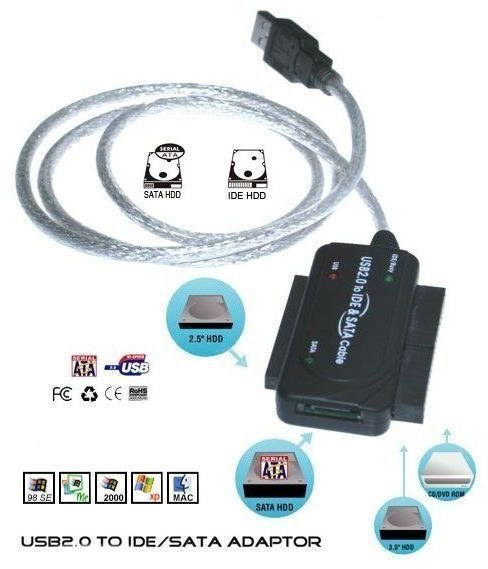
Alternatively, you can try a USB 2.0 IDE adapter kit – these are hot swappable devices designed to accommodate 2.5”, 3.5” and SATA drives, and feature a 2.5” IDE 44 pin connector for you to quickly connect your outgoing hard disk drive to your USB port. Devices of this kind are available for around $25 - see www.satacable.com for more.
If you have a HDD that is on its last legs (or possibly even refusing to work any longer) try either of these solutions to power up the drive one more time and retrieve your much needed data.
