Computer running slow for no reason? Seems to take an age to do the simplest thing? Always seem busy even when it shouldn’t be? Read this article to discover what can cause a processor to run at maximum capacity, and what you can do about it.
A computer processor is the engine of a PC. Nothing happens without it getting involved: doing the work or giving its permission for something to happen. This can mean that it gets a little busy at times when there is a lot going on.
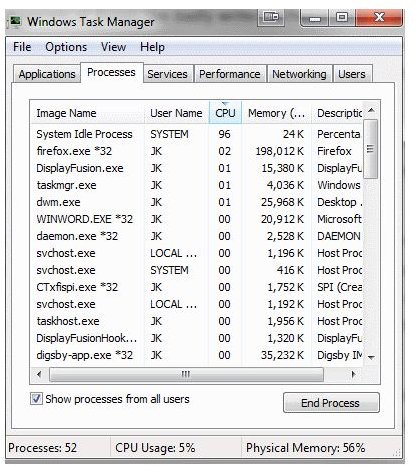
The workload of a CPU is measured in percentage of work time. When you check out Task Manager it tells you at the bottom the CPU usage in percentage terms. When things get a little slow, this is often the first place to look to see what’s going on.
By clicking on the CPU heading on the Processes tab, you can sort the list of processes by how much CPU time they are using. This is how you can tell which resources are using the processor the most. If the process called System Idle Process seems to be taking up most of the time, then it’s all good. This is a Windows process that just keeps the processor occupied while waiting for something to do.
If something else appears at the top, and stays there, more investigation will be needed.
So what can cause a CPU to max out?
In a normal situation, nothing should cause a CPU to max out permanently. It may spike every now and then, which is generally nothing to worry about, but it shouldn’t stay at 100%.
The answer to the question really depends on what you’re doing at the time. If there is a lot going on then it stands to reason that the processor is busy. Notoriously CPU intensive programs like video encoding, moving files, downloading, or games will use up a lot of the processors time, so it should come as no surprise if the CPU is at 100% while running them.
If the computer is near idle and the CPU runs at a high percentage then there is something else going on. Using Task Manager should tell you what’s going on, but it might not always know.
There are also things called software loops, which are times when a program gets caught up in something and can’t let go, a bit like a dog chasing its tail. This can be caused by a variety of things like badly written software, programs with memory leaks, or a perfectly good program caught up in a Windows page file error. There are many causes of these kinds of phenomenon and they are fortunately fairly easy to address.
Using Task Manager, find out what the program is that is taking all the processor time and highlight it. Then click in the bottom right, End Process. This forces the program to shut down immediately, and your system should return to normal. If the program is okay, restarting it should allow it to run normally again. You will loose unsave data though.
Unfortunately the most common cause of a busy processor on an idle machine is a virus. They hide themselves, or appear as an unobtrusive program which is why they don’t very often show up in Task Manager. The best thing you can do in this instance is stop what you’re doing and run a virus scan. Once the virus scan is complete, run a spyware scanner, then check for spyware.
Nothing should really cause a processor to run at 100% all the time. If yours does, then following the steps here should allow you to identify and address the situation.


