We can’t always get to a server to physically check how many processors it has, and rebooting to query the BIOS is often out of the question. This article discusses the different ways you can check how many physical processors are present on a Windows, Linux and Solaris server.
This isn’t a question that comes up that often, but is a legitimate one for those who maintain Microsoft licensing on enterprise systems, or use servers on a daily basis. For example, the Microsoft CPU licensing schemes are dependent on how many physical processors are on a server, rather than how many processor cores, which is different.
In that scenario it is important to get a count of how many physical processors there are on a given machine.
Modern processors come with two or four processor cores, called dual or quad-core. These cores act as virtual processors and can each handle instructions like a standalone processor. A single quad-core processor will appear in Task Manager or Device Manager as four processors, because they measure virtual processors, i.e. the cores, not the actual sockets.
To find out how many physical processors are present on a server takes a little more work. It isn’t always possible to reboot a machine, or even be in front of it to determine the hardware specs. With remote servers, or high availability machines, a reboot is out of the question. This is why we have to use other methods to find out this information.
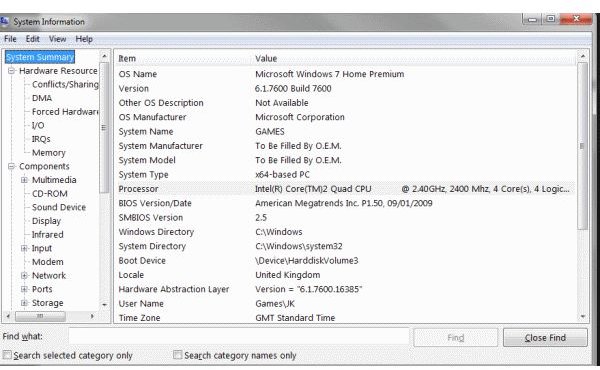
For Windows servers, there is the msinfo32.exe command. Which, when run will provide a snapshot view of the system in question, including the amount and type of processor installed. In this case there is a single quad-core processor running at 2.4Ghz.
Windows
There is also a program called Process Explorer. This is a free third-party tool that is a great source of information about a computer, and provides much more usable information than Task Manager. Select the View menu, then System Information then tick the box at the bottom that says “Show one graph per CPU” will immediately show you how many physical processors are present.
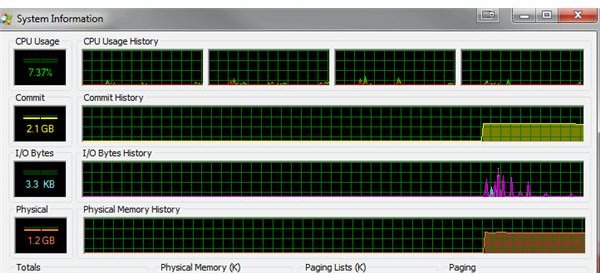
In this example, you can see there is one physical processor with four cores.
Linux and Solaris
In Linux there is a console command to show the number of processors on a system.
cat /proc/cpuinfo | grep processor | wc –l
This should return something like the image below.
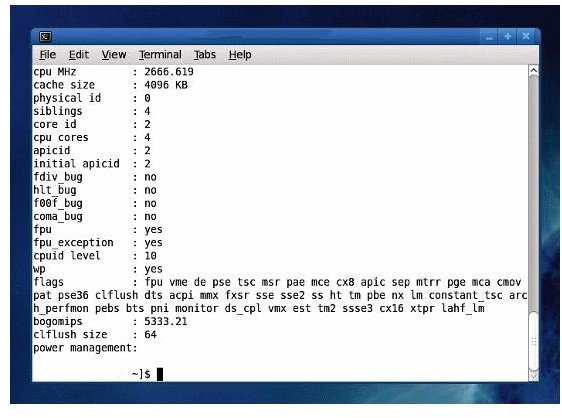
In this example the physical id of the processor is 0, and the cpu cores are 4. Therefore this is a single processor with four cores.
You can also query a Solaris machine if you need to with the psrinfo command. This will return a line for each physical processor, ignoring the cores.
So, whatever the server you are trying to investigate, there is a method of finding out what you need. The Windows command works on all types of Windows, Process Explorer does also. The Linux command works on most versions of Linux, and Solaris is just Solaris.


