There are various ways you can watch TV shows on your PC. It is easy to set up and it doesn’t have to be expensive. Find out how in this article.
Watch TV on Your Computer
Many of us spend hours working on a PC, and sometimes the tasks are monotonous and may not require our full attention. Wouldn’t it be nice to be able to watch TV while you work? Since your PC is probably not in the same room as your television, being able to watch TV on your computer can be very handy. It also saves people from having to buy a separate TV if they already have a PC. There are four main ways you can enjoy watching TV on your PC so let’s take a look.
TV Streaming Websites
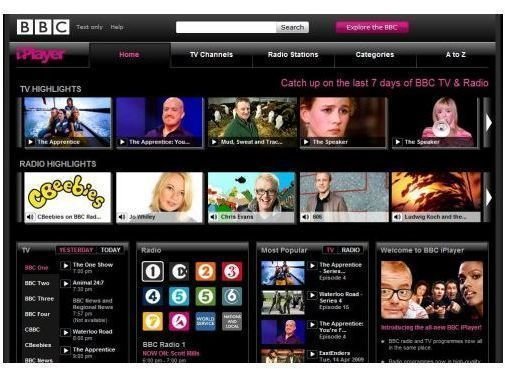
Here in the UK most of the big television channels have their own websites. Following the incredible success of BBC iPlayer many of them have chosen to follow suit and offer shows as free streams you can watch in your browser. BBC iPlayer basically offers a variety of BBC shows from the last seven days as free streams. The technology works well, it works in any browser, and the quality is reasonably good. It is also completely advert free.
Channel 4 offer a service called 4OD , and they actually made whole series of some of their most popular shows available. You can watch several episodes of things like Father Ted for completely free via your browser. Unfortunately on 4OD there are adverts but far less than you would find on traditional broadcast television. ITV and Channel 5 have belatedly followed suit with their own websites offering a range of repeated shows as free streams.
This is definitely the easiest way to watch TV on your PC as it requires no equipment or software. However you are limited to the selection available on the websites, and the shows only appear there after they have aired on scheduled broadcast TV.
Use an LCD TV as a Computer Monitor
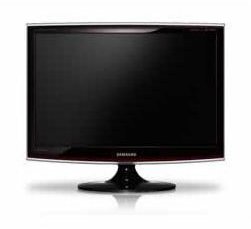
Perhaps the simplest way to watch TV on your PC is actually to buy an LCD TV which can double up as a computer monitor. The vast majority of LCD TVs nowadays have ports so you can hook them up to your computer and use them as monitors. They also tend to have built in TV tuners and all you need to do is plug in an aerial. They will tend to be a bit more expensive than stand alone computer monitors, but you won’t have to buy any additional hardware or software for your computer and the picture quality is likely to be better. Using an LCD TV as a computer monitor is a good solution.
Use an External TV Tuner
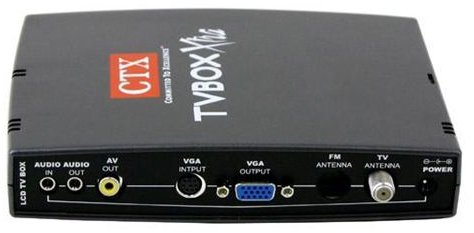
These are small devices that work in exactly the same way as internal TV tuners. The only difference is that you plug them into the PC and then plug an aerial into the device. You’ll need to install software and that’s it, you can watch TV on your PC. I used a Hauppauge device for a while before digital and the picture quality was very poor. They have been improved in recent years but make sure you check what resolution the device can handle. An external device will cost slightly more than an internal one.
Use an Internal TV Tuner
This is probably the most difficult solution. You can select an internal TV tuner card and fit it into your PC. This will require some basic knowledge of PC maintenance, although it is fairly straightforward. Once you have installed the tuner you’ll need to install the supporting software. Finally you’ll plug an aerial in the back, just as you do with your TV, and you can watch TV on your PC. There are a lot of choices when it comes to buying a TV card. Your best bet is to make sure the one you select supports digital and high definition.
Downloads and Streaming Websites

There is a fifth way to watch TV on your computer but since it is strictly speaking illegal, I can’t really recommend it. Despite the legal issues there is no doubt that millions of people around the world are using torrent based websites to download their favourite TV shows. You can select an episode you want and using a tracker file and torrent software you can download it from a variety of other people who have it stored on their computer. There are also websites which offer memberships and allow you to directly download TV show episodes for a small fee. These downloads tend to be completely advert free and come in a variety of formats and different levels of quality.
These solutions are definitely illegal, but since the website operators are often based in countries beyond the reach of UK or US law, they are tough to stop. It is also worth pointing out that so many people engage in downloading files illegally that criminalising all of them is completely impractical. However the authorities do occasionally make examples and there is always the risk you’ll be unlucky. The development of legal downloads is lagging behind. You can always buy shows from service like iTunes but they aren’t cheap.
Comparison
For ease you can’t beat websites like BBC iPlayer where you can select the show you want to watch and just stream it in your browser. You will need a decent Internet connection but most people have Broadband nowadays so it is likely that you have one. Either using an LCD TV with a built in tuner as your monitor or installing a TV tuner card will leave you at the whim of the schedules. On the pro side the TV tuner cards will allow you to record shows but you’ll need a lot of hard drive space if you want to capture at decent quality. You can always compress later to save space but it is time consuming and can be a technical hassle. It may be an unpalatable truth but to get exactly what you want in a compact file at decent quality and to be able to store it on your hard drive the best solution is illegal file sharing or direct download websites. That’s the reason that they are so popular despite their illegality.


