We look at the variety of peripherals and other solutions which can make it easier for users with varying degrees of visual impairment to use their computer. Some of these options will also be useful even for people with good or perfect vision.
Accessibility software USB sticks
While there are many programs and operating system tools which can assist people with visual impairments, it can be tricky to use these when working on another machine, for example in a “hotdesking” office or a cybercafé. Several companies, including Dolphin , now offer their accessibility software on USB sticks which will work automatically when plugged into a machine, usually without making any permanent changes to the machine’s standard settings.
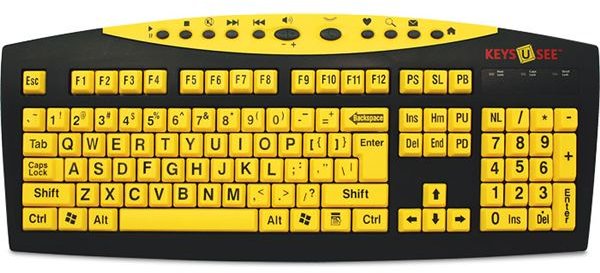
Large print keyboards
Firms such as Key Connection offer keyboards which, while a standard size, have each character written much larger (the equivalent of 40pt text or more.) These keyboards are normally available in a range of colour schemes which can give a better contrast than the traditional white-on-black format. For around half the price of such keyboards you can also buy sets of stickers to place onto an existing keyboard, but as these could be quite fiddly they may not be very good value.
Anti-glare filter
This is a thin transparent layer (preferably glass, but plastic models are available) which fits on top of your existing screen. It can work in either or both of two ways: reducing the amount of external light which hits the screen and reflects back, thus obscuring the display; and reducing the visible flickering as the screen refreshes.
Daylight bulbs
It may be worth investing in daylight bulbs for your office or workspace. They are available in traditional, energy saving and fluorescent versions. These bulbs have a slight blue tinge, which helps cancel out some of the yellowness that appears in artificial light. The result is that the light given off is much lighter and closer to natural daylight. This means colours on your screen appear much more clearly defined, and that there will be less strain upon your eyes.
Monitor size
As well as using accessories, the monitor itself can help with vision problems. One option is to use a large-screen monitor, they are becoming cheaper these days. You may even be able to save cash by using a single screen which is both a monitor and television. Another option is to use two monitors side-by-side, which is much easier with today’s flat screens. Doing so means you can view text at a much larger size without having to worry about fitting everything on the screen at once.


