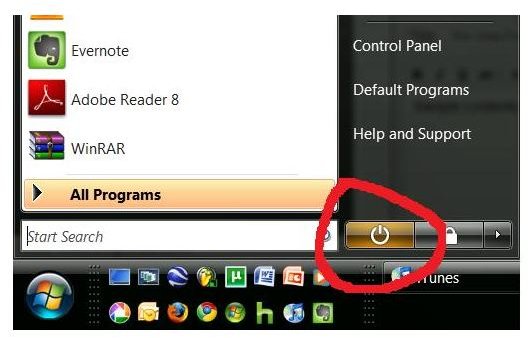
You may have noticed but Vista has this weird feature: the power button doesn’t actually turn the computer off but puts it into hibernate, a low-power state the keeps all your programs in memory for a quick reboot. Is this a good idea for laptops?
What is Hibernation?
When a computer is running it stores the running programs (the stuff on your screen) on the RAM memory. RAM memory cannot hold information without power; so when you turn your computer off your RAM is cleared and everything you were working on is no longer there and must be reopened.
Hibernation is a method of shutting down in which all of the stuff on the RAM–the stuff you are working on and have running–is stored onto the hard disk before shutting down. When you boot up your computer from hibernate it then reloads all of this information back into RAM so that you can resume right from where you left off.
What is Wrong With Hibernation?
There are two main problems with using the hibernation feature:
-
It takes a long time. The computer has to spend all of the time to write the RAM to the Hard drive and then back again once you boot up. This can take several minutes. Sometimes it is actually quicker to shut it down fully then reenter the programs you were using after a full restart later on.
Advertisement -
Errors are common, causing freezing or faulty startups. This can occur because of problems in transfer or with programs and drivers that are incompatible with the hibernation mode.
Hibernation in Vista
Hibernation became a core feature in Windows with the release of Vista. When you
press the power button in the Start menu (the one circled to the left), it actually doesn’t shut down the computer but takes it into Hibernation. This often confuses people since while in Hibernation mode the power light will remain blinking and many people will think their computer hasn’t shut down completely. To do a shutdown without hibernating you have to click on the little arrow nxt to the lock button and select shutdown.
You can change this option by going into the Power Options of the control panel and going to System Settings. The default is set to sleep, a type of hibernation, but you can change it to full hibernation or power off when you hit the power button.
Hibernation and Laptops
Hibernation was originally created mostly for laptops. When on the go it is helpful to be able to stop operation and pick right back up again without having to do a full shutdown. Since the laptop is technically powered off during hibernation this shouldn’t result in data loss or hardware damage (like it would to carry the laptop running, a very bad idea). However, this is something that you are going to have to test on your laptop to see if the function works properly.
I have used an HP laptop with Vista for about a year and found that it did not handle hibernation well at all. When it went into hibernate it almost always froze coming out of it. When it didn’t freeze it took nearly three times as long to come out of hibernate as it did to reboot. So in this case it was much more advantageous to just shut it down normally–so I set the power button to just shutdown.
However, this was probably largely due to the age of the laptop, it’s weak hardware specs, and incompatible drivers. I would conduct a little test with your laptop to test whether you want to use the hibernate feature. Boot your computer up and open up some applications you normally use. Grab a stopwatch and then restart the computer, timing how long it takes. Do the same with taking it in and out of hibernation. There should be a significant difference in time but depending on the speed of your computer it may be more pronounced.
Then it is simply for you to decide: is the extra wait-time on bootup worth not having to reopen what you were doing? If you are the type of person who needs to access their computer quick, such as a college student needing to quickly take notes for class, it might actually be quicker and easier to do a full shut down.
My general suggestion is this: if you have the powerful enough hardware on the laptop and it doesn’t run into conflicts with drivers, go ahead and use the hibernate feature. If not, you are far better of staying away.


