How do I Connect Speakers to my Computer?
The Quick and Easy
Hooking up computer speakers will only take you a moment. Chances are you already have an sound card in your computer so its a simple matter of unpackaging your speakers and plugging them in. The software and drivers for the speakers come packaged with the sound card, so it should automatically detect them once you do.
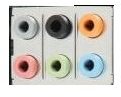
Take a look at your speakers. Most units are pretty simple. If they are small computer speakers they will only have one cord: a green headphone-sized connector. To hook this up to your computer look at the back of the unit and locate the corresponding green jack. Most computers will have 6 connectors that look like this:
The green one in the bottom center is for the audio output; it is where you will plug in most speakers. Many laptops only have the pink and green; still place it in the green. Some PCs will also have the pink and green in the front of the computer as well; you can plug it in there if you’d rather.
Once plugged in, turn them on and see if they are working. Most likely your computer should acknowledge that something was plugged into the jack, but some will not. For the basic speakers this is all you need to do.
Large Speaker Systems
If you bought a 2.1, 4.1, or 5.1 speakers system then things are just a bit more complicated. These systems consist of a subwoofer and any number of other speakers. In most cases, these speakers will connect centrally into the subwoofer, which will then plug into the outlet and to your computer. These systems normally come with a green cord like that one I described above. Everything will be color coded. Place your subwoofer where you like it and then hook up the auxiliary speakers to the subwoofer using the color coded cords. Following this, attach the green cord from the subwoofer to the green input jack in the computer. At this point the computer’s sound card should recongize the speakers.
It may be that you will have to configure the computer for the speakers, particularly if you have a 4.1 or 5.1 system. In XP, go into the control panel, click “sounds, speech, and audio devices,” then click “sounds and audio devices.” This will bring up your options for the speakers. Under the “speaker settings” section, click advanced. This will then let you select the type of speakers from a list in the drop down box. Select your type of speakers and click ok.
Most likely your computer came with software for your sound card as well. You should check to make sure that it also knows what type of speakers are hooked up. Normally the software places an icon in the taskbar. For example, this computer has a little red speaker icon for the RealTek drive. Right click this symbol and open the options or manager. This should have a section where you can choose what type of speakers are hooked up.
More Advanced Stuff
Some speakers are wireless, so hooking them up might be a little different. Normally you place your speakers in the desired spots and hit a button to connect the speakers together wirelessly. There should be a button on the receiver and on each speaker that need to be pressed to do this. Once these are all connected you simply need to plug the receiver into the computer.
A lot of the nicer systems also come with their own software to help your computer manage their awesomeness. Check and see what is included with the system; if there is a disk then you should run the software installation prior to connecting the speakers.
For the more advanced speaker sets you will find that there are several cords that are the standard headphone size but are different colors. If this is the case then you will need to plug in each individual speaker set into different ports. They are as follows (pictured above)
Green: front channles
Gold: center and subwoofer
Gray: side channels
Black: rear channels
The two remaining hookups are for microphone input (pink) and audio input (blue). You won’t need those here.
To have your computer read those hookups you will most likely need additional software. Most of these speaker systems come with this software packaged. However, in many cases the type of sound card that came with your computer is not powerful enough to drive these advanced speaker sets and you will have to buy and install a new sound card. This gets a little complicated but you can follow this guide over here.
Once again, once the speakers are connected make sure that both the drivers from the Operating system and the audio card are set for the right speaker system. With this you should be set! If you’ve been through all this and things still aren’t working try this guide to fixing computer speakers to see if you can resolve the issues.
Alright, well hopefully you’re up and running! Don’t annoy the neighbors too much with your incredible system.
