Flash drives allow you to store and transfer files. Copy a file to a flash drive to move files between work or school and home or the library. Copying a file to a USB is surprisingly easy, as well.
Open the USB Flash Drive
Plug your USB flash drive into a USB port on your computer. The flash drive folder may automatically open. If it does not, go to My Computer or Computer. Look for the flash drive under Devices with Removable Storage. If there are several items there and you are not sure which one is the flash drive, you can open My Computer before inserting the USB flash drive into the computer and then watching for a new device to appear in the list.
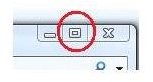
Open the USB flash drive folder and resize it by clicking the Restore Down button to the right of the Close button on the window or by clicking on one of the borders of the window and dragging it smaller.
Find the Files
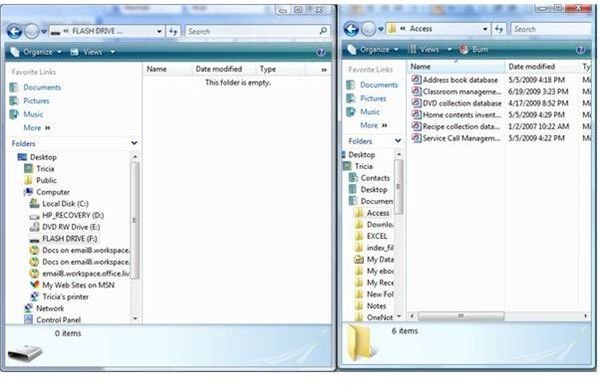
The next step is to locate the files you want to copy from the computer onto the USB flash drive. Open the folder containing the file or files that you want to copy, but do not open the files. As with the USB flash drive folder, click the Restore Down button or grab the side of the folder window and resize it. Move the USB flash drive folder window and the folder with the files you want to copy so that they are side by side and you can view both folders.
Copy Files
Select the file you want to copy to the USB flash drive by clicking on it once. If there are several files that you wish to copy to the USB flash drive, press and hold the Ctrl key while you click on each file. The files must be in the same folder for this to work. Otherwise, you will need to copy them to the USB flash drive one at a time.
Once the files are selected, click on any highlighted file with your mouse, hold down the mouse button and then drag the file or files into the USB flash drive folder. Once your mouse pointer is inside the USB flash drive folder, release the mouse button and the files will be copied into the folder
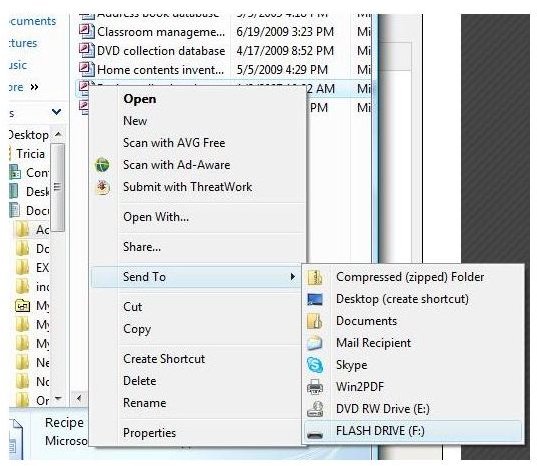
Another way to copy files to a USB flash drive is to skip opening the USB flash drive folder altogether and going directly to the folder that contains the file or file you want to copy to the USB flash drive. Select the file (or files) in the same manner, then right click the highlighted area, point to Send To and select the USB flash drive in the list.
Remove the USB Flash Drive
Once you are finished copying the files to your USB flash drive, you will want to remove the flash drive from the computer. However, you should not just pull it out of the USB port. Instead, look for the Safely Remove Hardware icon in the system tray, near your computer’s clock. Click the icon once and then click on Safely Remove USB Storage Device. When you see a message that it is safe to remove the USB flash drive, you may unplug it.

For more USB flash drive tips, read Transferring Photos Via USB Flash Drive and Top 13 Free Security Tools to Keep on Your Flash Drive .


