How do I Install a Linksys Wireless Router: Setup and Configure Linksys Router
Wireless Networking 101
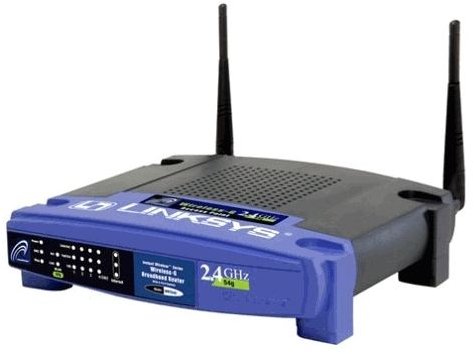
I have heard many horror stories about people trying to install a wireless router in their home, but I have been lucky enough to never have any issues that couldn’t be rectified with a little bit of lateral thinking. Of course, I have been working in Information Technology for more than ten years and know a thing or two about computers. This article will tell you how to set up a Linksys Wireless-G Broadband router in order to establish a wireless network within your home or office.
I think part of the problem that some people have when it comes to setting up wireless routers is that manufacturer’s these days are skimpy when it comes to instruction manuals. My Linksys router came with a simple fold-out sheet that had more pictures than words, and most of the install is handled by a CD with step-by-step onscreen instructions. Following these steps is easy, but we can go beyond these very basic instructions provided by Linksys.
Before you get started, don’t forget that you’ll need a PC with a wireless adapter in order to access the wireless network. Most laptop computers have one built in, but many desktops do not. You may have to invest another $40-$50 in a wireless adapter if you plan to use this with a desktop. I also use my wireless router for connecting my Sony PlayStation 3 and Nintendo Wii video game consoles, and it works great. If you plan to do so, make sure your gaming console has the wireless functionality built in because certain models do not have the capability without additional hardware.
First, you need to pick a location for your wireless router. Since it will need to connect to your DSL or cable modem, many people just put them in the same place. Make sure you have a surge protector strip that can handle everything. I recommend that you put it someplace where it is out of the way, but not covered up or near anything that may cause interference, like a television. The one in my house actually sits on the back corner of a nightstand, with the lights facing away from the bed so they won’t be distracting at night.
If you lost the install CD that came with the router, you can download it from the Linksys website at https://www.linksys.com/support. It will save you a lot of trouble when initially setting up the router, especially if you want to rename it or set a network password during configuration.
Connecting the Wireless Router
Physically connecting a wireless router is relatively simple, since you only have two things to plug into it. First, you plug in the Ethernet cable that goes from your DSL or cable modem directly to the first port, labeled in blue, on the wireless router. If you wish, you may run a line from this wireless router directly to your computer, since it also serves as a 5-port hub. After that, just connect the power and it should light up and start connecting.
Once the router is plugged in and connected to the modem, the Linksys software will detect it and start going through some options for configuring the router. When prompted, I highly recommend that you put in some kind of password for your router. If you don’t, you could be providing free Internet services to anyone close enough to your home or office to pick up your connection, and this of course opens up considerable security risks too. Anyone running a wireless network wide open is asking for trouble.
After the configuration is complete, you are ready to go. From any computer with a wireless adapter, just let it search for wireless networks within range and you should see yours in the list. If you set a password for it, you will be prompted to enter that password the first time you connect to your wireless network. After that, you’re ready to go.
Troubleshooting Q&A
What if I can’t connect to the Internet?
Make sure everything is powered on and that your DSL or cable modem is getting a connection. I know mine at home will go up and down every once in a while, and sometimes it helps to just reboot everything to help re-establish the connection. Also, make sure the Ethernet cable coming from the modem is plugged into port 1 on the wireless router.
The wireless router does not replace your modem.
You will still need a cable modem or DSL in order to use this wireless router. It must be connected with an Ethernet cable to the modem, so they work together. The wireless router works by taking the signal from the modem and converting it into a wireless signal. Without some kind of signal input, it has nothing to do.
High speed Internet required?
You cannot use a dial-up Internet connection with a wireless router. It just doesn’t work that way, and there’s not enough bandwidth available from a dial-up connection to even support it. Unless you are paying for a high speed Internet service, a wireless router like this by itself will do you no good.
How do I get into the router to change advanced settings?
All you have to do is type the address https://192.168.1.1 in your web browser. It may be https://192.168.0.1 if that does not work. This will connect you directly to the router, and should prompt you for a password. By default, the username and password will both be ‘admin’ (minus the quotes!) unless you set it to something else during configuration. Be very careful when changing any of the settings in your router.
