Purchasing hardware is not as easy as going to the local Electro-Mart and following the salesperson. You can choose on your own, but you must be careful. What you actually read on the box may not always tell you the whole story. Here is how to decipher things for CPUs.
Introduction
We will not give you an all-in-one CPU (Central Processing Unit) shopping solution in this article. Instead, we will look individually at CPU features and try to give you a good understanding in order to better choose your next CPU. I use the word “better” intentionally. It does not mean “the best CPU around”; it means “the CPU that fits your purpose.” Hopefully it also means “the CPU that you purchased after looking at all the specifications.”
Speed
The speed of the CPU can be defined as the number of instructions it can process per second. For example, a processor may be capable of performing 23.860 million instructions in a second. But in computer science, the Million Instructions per Second (MIPS) is regarded as “not usable” because of its limitations.
This is what everybody looks at first to have an idea about the CPU. OK, this is expressed in Gigahertz nowadays and is a good indicator of how many cycles the CPU can make in a second. For example, an Intel Core i7 CPU can make 3.2 Gigahertz (3.2 x 1024 x 1024 x 1024) of cycles in a given second (top performance.) The higher, the better of course.
Number of Cores
There is a constraint when you want to fit things in a predefined area/volume. In the same way that you cannot fit a hundred plates into a small box, CPU manufactures cannot fit ever more transistors in a defined CPU area. When the manufacturers reached this limit, they decided to install more CPU cores in the CPU rather than trying to fit more transistors and increasing the speed. That’s how multiple-core processors came to the market.
The number of cores is important when you are working with CPU-intensive applications. For 3D modeling, ray tracing, video editing applications, you will benefit from many cores. But you are not likely to notice any difference when you are working with your Office Suite – a word processor, a spreadsheet etc. It is important to take into account the way you will use your computer when deciding the number of cores.
Sockets
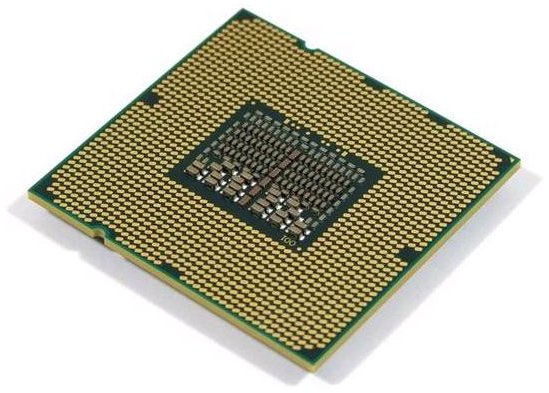
The CPU is connected to the motherboard in the appropriate socket. On the CPU, the side that is inserted to the motherboard has the so called pins, the small needles that enable the CPU to interact with the motherboard. Sockets are defined with the number of pins that the motherboard has and this is defined also with the CPU specification. For example, Intel’s Socket B (LGA 1366) processor (codenamed Nehalem) has 1366 pins on it. With the new processors, Intel will market LGA 1160 and LGA 1567 sockets, which show that they will have 1160 and 1567 pins respectively. The number of sockets will define which motherboard to choose (because you will not be able to connect at 1366 pin CPU to the motherboard which has 1160 pins on it) and in turn will affect the processor’s efficiency (a 1567-pin CPU will run more efficiently and faster than a 1160-pin CPU.)
AMD has a different naming convention: such as AM2, AM2+, AM3 etc. AM2+ supports 940 pin sockets and AM3 supports 938. The difference of 2 pins is not important, but in terms of system architecture, AM3 supports DDR3 RAMs but AM2+ support DDR2.
When choosing your CPU, be sure to take a close and detailed look on the sockets available and which socket supports what technology.
Read on for hyper-threading, cache, Front Side Bus and Quick Path Interconnect.
Hyper-threading
Hyper-threading is Intel’s trademarked technology on simultaneous multithreading. This technology enables the CPU to process more than one command at the same time. Hyper-threading capable processors are Pentium IV and Core i7 processors. If you have a CPU capable of hyper-threading, say a Pentium IV, which has one processor core, the processor will be recognized by the system as two CPUs instead of one. Intel did not use this technology with the Core Duo, Core 2 Duo, Core 2 Extreme and various processors after Pentium IV, but reintroduced it with Core i7.
Cache
The cache is the first place where the CPU looks for commands. In modern CPUs, there are multilevel caches defined as L1, L2 and L3. When the CPU receives an instruction, it first consults the L1 cache, if it cannot find the command there, it goes to L2, if not to L3, and finally, to the main memory. Considering that the flow inside the CPU is way faster than what is between the CPU and the RAM, having a larger cache seems to be better, but this is not always the case: larger caches has larger latencies. So, the processor manufacturers overcame this problem by placing a larger L2 cache behind the smaller L1 one.
The cache is the main difference between the regular x86 Intel processors with the Celeron line. The Celeron family’s cache is smaller than the same speed x86 CPUs, making them have lower performance.
Front Side Bus (FSB) & Quick Path Interconnect (QPI)
Front Side Bus (FSB) is the connection between the CPU and the north bridge on the motherboard (the north bridge is the chip responsible for communications among the CPU, RAM, and graphics adapter.) The higher connection speed means that the CPU can communicate with main memory and the graphics chipset or card faster.
AMD has criticized the Front Side Bus many times by stating this as an old technology. Contrary to Intel CPUs, AMD has the north bridge inside the CPU, making FSB useless.
With the Core i7 CPU series, Intel has implemented the same technology and named it “Quick Path Interconnect.” So, with Core i7 series, FSB will be an abandoned technology.
Conclusion
I hope I could give you an overall idea about what the labels tell you about the specifications of the hardware inside. My aim was to enable you to make informed decisions and choose your CPU by considering everything about it.


