How to Connect a Power Supply to Your PC? Taming the PSU Noodles
I Bought A Power Supply. It Has Pasta Dangling From It.
Power supplies, even new ones with special sleeves designed to make cable management easy and more attractive, are far from the most graceful products in the world, or the least confusing. Video cards, processors, and hard disks tend to come with details instructions detailing exactly how to proceed with installation, or at least have them online. But buying a power supply generally nets you only a thin warning about the dangers of working with a power supply when it is plugged in, and a little baggie with four screws.
Making sense of the plethora of connections is, therefor, often difficult. Sure, certain pieces seem to sit properly in certain places, but this is a power supply we’re talking about. Best to err on the side of caution. But don’t worry any longer, because this quick guide details all the different connections you might find on a modern power supply. In practice, most connections do more-or-less fit where and only where they’re supposed to, but since this isn’t Lego blocks we’re hooking together here, a bit of reassurance doesn’t hurt.
Molex Connections
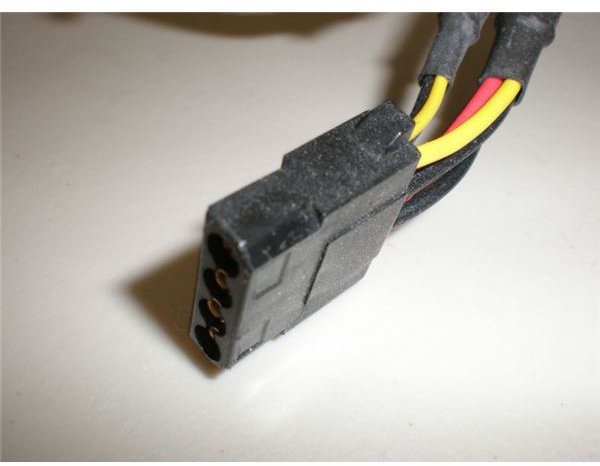
More likely than not, most of the dangley bits hanging from your power supply are going to be Molex connections. A Molex connection is a flat, rectangular four-pin connector, with two angled corners so that it will only fit one way. Typically, it will have four wires coming from it. The plastic end of the connector can be any color, and it usually is not printed with any sort
of label. Most Molex connectors are kept in place only by friction, which is to say you have to give them a good shove in order to get a male and female end together, and give a good tug (on the connector, never pull on the wires) to get them apart.
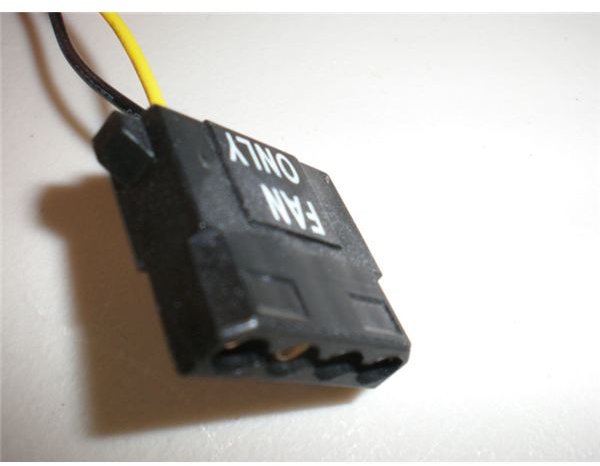
Molex connections are very common because they are used to power all sorts of accessories, like case fans, some internal and external drives, and any special features like customized lighting. They can sometimes be difficult to use because they are only kept together by friction. Most Molex connectors are the standard four-pin design, but you may also run into some specialty connectors. For example, some companies use “Fan-Only” connections which look like standard Molex connections, but which only have two pins.
SATA Connections
The SATA power connection is meant primarily for internal and external drives, and replaces some of the function of the Molex
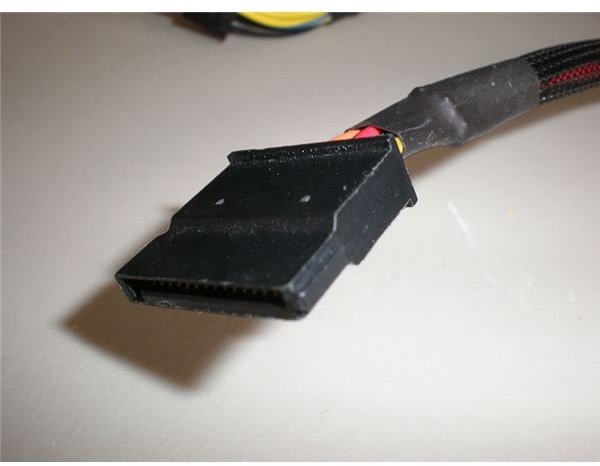
connection, which used to be the primary power connection for hard drives and external media drives. It is still rectangular, but is much thinner than a Molex connector. It also has an L-shaped connection, which ensures that the connector can only be inserted in a particular fashion.
There are adapters which can turn an SATA connection into a Molex connection, or vice versa. Most power supply only include four or five SATA connections, because they are used only for hard drives and external media drives. This means a Molex-to-SATA adapter may be required if you have numerous SATA drives, or an older power supply.
4-Pin Or 8-Pin 12V Motherboard Connection
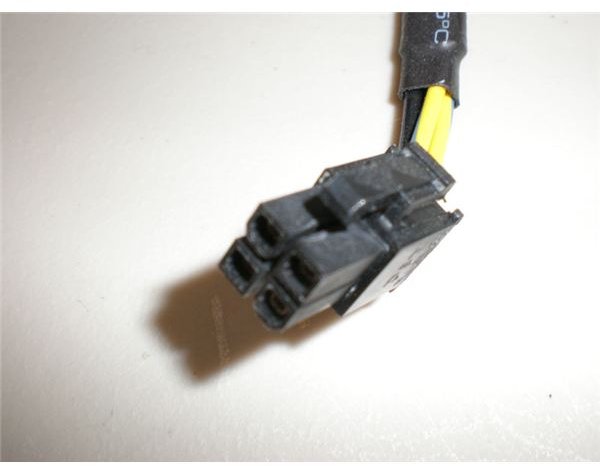
The 4-pin motherboard connection is probably one of the most confusing power connections around. The area it connects to on a motherboard is not intuitive to those who have not constructed many computers. However, the shape of the 4-Pin motherboard connector is unique, both because of its 2x2 pin design and the shape of its pins.
The purpose of this connection is to provide power to the CPU. In some rare instances, mostly involving ancient motherboards and/or processors, this may not need to be plugged in. However, most modern machines will require it. This connection can be difficult to plug in, but it is designed to only fit one way, because aligning the prongs wrong could cause damage to your computer. A visual inspection of the connector should allow you to line up the connection properly. Most 4-Pin motherboard connectors keep themselves secure with a latch, and are easy to attach and detach because of this.
In some instances, when using motherboards that support multiple CPUs, you may run across an 8-pin connection. Not all motherboards which have the potential to accept an 8-pin connections need an 8-pin connection. Some will accept the 4-pin connection. There may be drawbacks to using only a the 4-pin connection, however, so consult your motherboard manual.
20 Pin / 20+4 Pin / 24 Pin Motherboard Connection
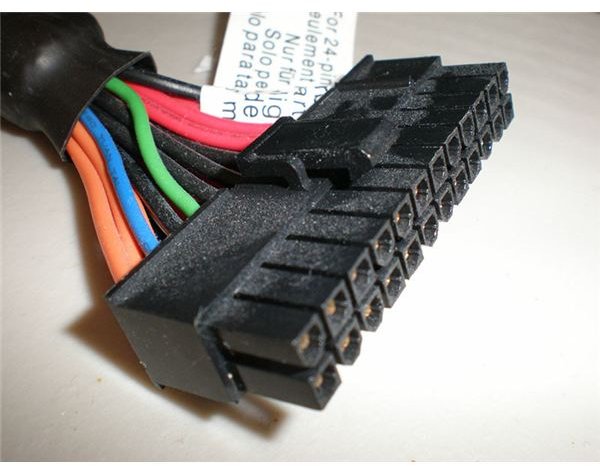
This is your motherboard’s primary connection. Some motherboards, particularly low-end or older models, only require 20 pins in order to operate. Others require all 24 pins of a 20+4 connector in order to function correctly. The details on this vary from motherboard to motherboard. Some motherboards can receive a 24-pin connection, but only require 20 to operate normally. Others will not operate at all unless the full 24 pins are plugged in.
Like the 4-pin motherboard connection, 20-pin/20+4 pin connections often secure with a latch, and can only be inserted in one specific way, due to the how the pins are shaped. However, you may run into problems with 24 pin connections which are not actually a 20+4 pin configuration, but simply 24 pins. The difference is that on a 20+4 pin configuration, the bottom four pins can detach, so you can use the connection on a motherboard that only accepts 20 pins. 24 pin connections do not allow the bottom 4 pins to detach, however, and this typically means the 24 pin connection will not fit a motherboard that is only set up for 20 pin connections. This is something to consider whenever buying a new power supply or motherboard, though inexpensive adapters are available.
PCI Express Power Connection
The PCI-E power connection is a 6-pin connection made specifically to fulfill the high power of modern
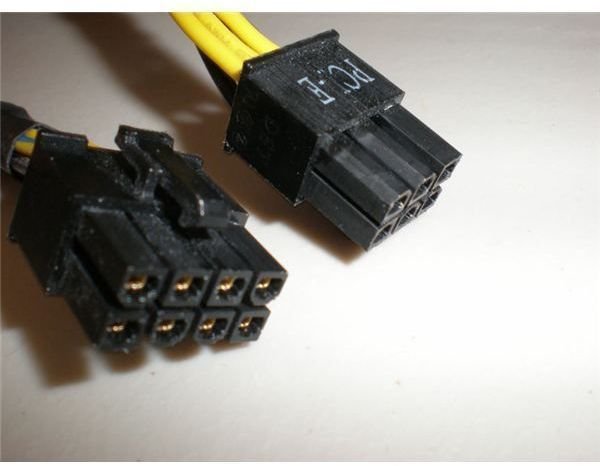
GPUs. In most cases, they are very easy to find, simply because they have the label PCI-E written clearly on one side of the connector. If this is not written, they’re still fairly easy to locate, since it looks rather different from other PSU connectors. Like the motherboard power connectors, the PCI-E connector is easy to work with due to its latching mechanism. There is only one proper way to attach this kind of connection, and little force is needed to insert the connector.
While most power supplies have at least one PCI-E connector, this is not always sufficient to power modern GPUs. There are some video cards which require two connections, such as ATI’s Radeon 4870 and Nvidia’s GTX 260. In addition, there is a special 8-pin PCI-E connection which is used on super-high end video cards, such as the Radeon 4870X2.
If you do not have a PCI-E power connection, most video cards come with an adapter that can turn two Molex connections into one PCI-E connection. This can become unwieldy if your video card is a tight fit for your case, however.
3 Pin Fan Connection
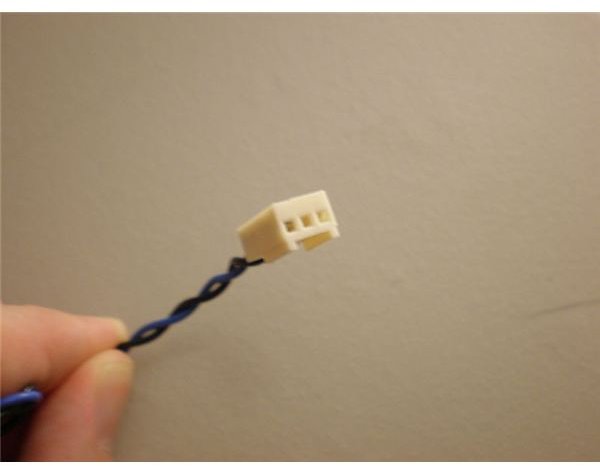
These fan connections are easy to separate from all of the other connections dangling from your power supply because of their small size. Consisting of only three pins, the purpose of these small connections is to power case fans. Many power supplies sold today lack these connections entirely, because most fans are equipped to be powered via a Molex connection. However, if your fan and power supply does include these traditional fan-only connections, they are usually a better bet than using Molex. The small size of their wires and of the connection itself means a reduction of wiring clutter, and although there is no latching system used, these fan connections are typically easy to work with due to the low amount of force needed to attach or detach them. More on case fans in this article.
4 Pin Floppy Connections
The purpose of this 4 Pin connection is to provide power for small, lower-power external devices - mainly floppy disk drives. It looks very
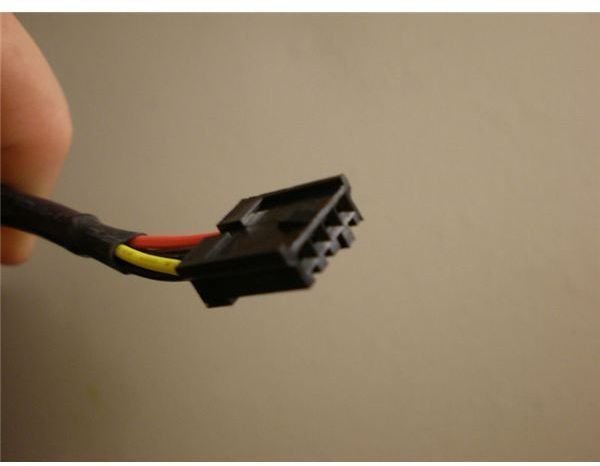
similar to a fan connection in size. It is a low-power connection, with a configuration similar to a Molex connector. Some adapters do exist which allow for conversion of a Molex to a 4-pin floppy disk connection.
This is very nearly a legacy connection, however, which means that it is becoming increasingly rare to find this on new power supplies, and is it also becoming difficult to find adapters for this kind of connection. In most modern PCs, a floppy drive is absolutely the only hardware which would use this connection. Power supplies that still include this connection tend to be enthusiast models or older designs.
Patience For Power
These are not the only connections you could possibly find on a power supply, but these are the connections you’ll find on a modern computer power supply. Assuming that the hardware you’re working with is less than half a decade old, you’ll probably not run into any other kind of connection besides those listed here. Legacy connections are unfortunately, but understandably, difficult to find support for, both in the form of native connections by power supply companies and in the form of adapters.
Plugging power supply connections into the right places is simply a matter of finding the square peg to go into the square hole. If you’re dealing with a power supply for the first time, reading this guide will help. I strongly suggest that you print off the actual pictures of each connection. This makes visually identifying each connection on your power supply very easy, and once you know what a connection is, finding where to place it isn’t difficult. Power supply connections are fairly specific - there is no way to try and hook a SATA connection into a PCI-E card, for example.
Just remember to have patience. Dealing with tangles of wires can always lead to frustration. If you find that you are able to identify individual connections, but them lose them back into the tangle of wires, then wrap masking tape around each connection as you find it, and write the name of the connection on the tape. Having some tape on hand to bundle connections can make the task of sorting through power supply connections much easier. You can find out more about installing a power supply here.
