Need broadband on the go? Verizon Wireless offers three hardware components to connect you to the Internet. With a wide area of coverage, this ensures you will have Internet connectivity regardless of where you are.
Verizon Wireless Broadband
Verizon offers three connection devices for laptops. These three types of devices are: Expresscard, Standard Type II and USB which are given as options. Verizon also offers two plans for Internet connectivity. The two plans are basic, which offers 50 mb and a premium plan that offers a 5 gb data download. The advertised wireless speeds are 600 kbps to 1.4 Mbps downstream and 500 kbps to 600 kpbs upstream.
Installation and Setup
Setup and installation of the software is easy. The software installed without errors and the hardware drivers installed flawlessly. Verizon’s offering of three devices insures there are diverse hardware components to ensure that your laptop has connectivity. The software installs a dial up with the hardware’s cell number and creates an interface that is easy to use. The Verizon software shows wireless connections and signal strength. The performance is good depending on signal strength and time of day. I have seen a decrease in speed on weekends and holidays. Testing the connection through online speed connection shows an average close to what Verizon advertises. With Verizon Wireless Broadband, a majority of the U.S. is covered, giving you access across a wide area regardless if your needs are urban or rural.
Sharing an Internet Connection
If you wish to share this connection, there are several options available. We are going to review the setup of connecting through a proxy server.
Tools Needed:
- Laptop with Verizon Wireless Card, internal wireless and AnalogX
- Wireless Access Point
- Second computer with Wireless access
The primary laptop that has the Verizon Wireless Card can be set up as a proxy. My choice for proxy software is AnalogX. AnalogX allows for the connections of multiple computers through your proxy server (in this case, Windows XP).
Although no server software is used, Windows XP or Windows Vista can have AnalogX loaded on the computer. First, set a static IP address of 192.168.40.20 on this computer. Remember this computer has the Verizon Wireless card and AnalogX. Connect to the Wireless Access Point and use the Verizon card to connect to the Internet. (The computers can be connect via Ad-Hoc mode if a wireless access point is unavailable) See How to set up an Ad-Hoc network in Windows XP or How to set up an Ad-Hoc network in Vista .
Second, set the IP address to 192.168.40.21 with a gateway of 192.168.40.20 with no DNS server information. Connect to the wireless access point.
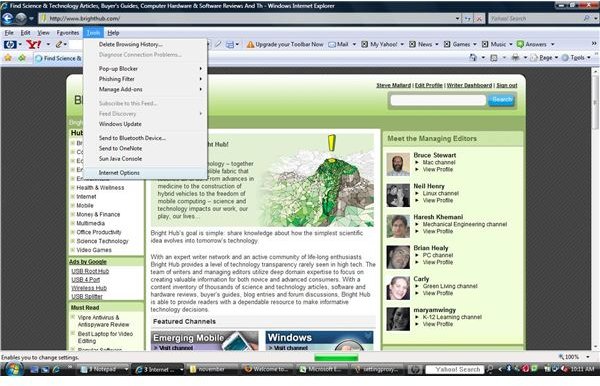
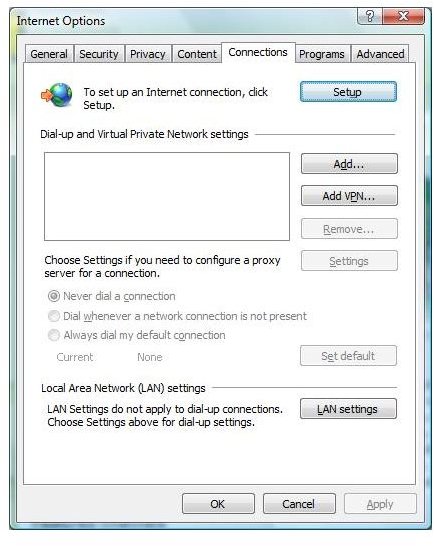
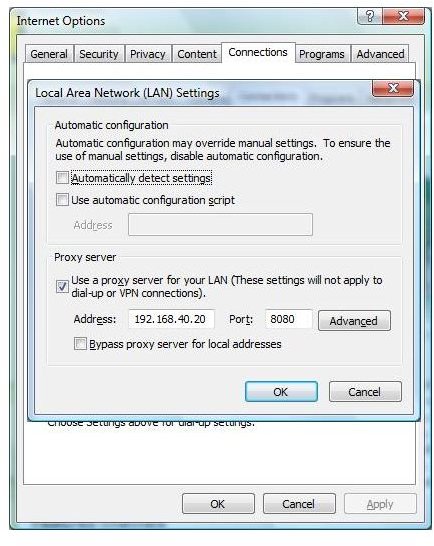
Third, use Internet options under Internet explorer to set the proxy server to 192.168.40.20. The primary port is 6588 with AnalogX.
Remember this secondary laptop is not mobile outside of this area and relies on the primary laptop. There are dozens of ways to connect through another computer including routers that will use these devices so no proxy is necessary.
Setting Up a Proxy